

About Active Directory configuration for QM, Analytics, Insights, and Performance Management
The Active Directory Configuration page lets you create or edit a connection between Calabrio ONE and an Active Directory (AD) server in your environment. You can use this connection for user authentication, sync, or both.
Note the following parameters when configuring the connection with the AD server, whether for authentication, sync, or both:
- At least one configured AD must exist.
- Each AD domain must have at least one configured user path.
- The Calabrio ONE server must be in the same domain as the user.
Authentication
AD authentication enables you to use AD users and passwords for authentication in Calabrio ONE. It is available only for on-premises deployments of Calabrio ONE.
Sync
AD sync enables Calabrio ONE to sync Calabrio ONE users with AD users. When AD sync is configured, Calabrio ONE matches existing Calabrio ONE users with existing AD users. Then, whenever an AD user’s first name, last name, employee ID, or email address is changed, Calabrio ONE also changes the corresponding values of the matched Calabrio ONE user.
- AD sync does not add or deactivate Calabrio ONE users.
- If Calabrio ONE cannot match an AD user with any existing Calabrio ONE user, it does not add a new Calabrio ONE user.
- If an AD user who is synced with a Calabrio ONE user is deleted in AD, Calabrio ONE does not deactivate the Calabrio ONE user.
You can review which AD users are matched with Calabrio ONE users and which ones are not on the Active Directory Sync page (see Review Active Directory sync results for QM, Analytics, Insights, and Performance Management).
Matching users
The following list provides an overview of how Calabrio ONE matches users.
- The administrator configures the AD connection, including the organizational units that contain the users to be synced.
- The administrator selects one of four matching properties: Default, Employee ID, First Name / Last Name, or User Name. If the administrator selects Default, Calabrio ONE uses the Default matching property only. If the administrator selects First Name / Last Name, Employee ID, or Email, Calabrio ONE first uses the Default matching property, then uses the selected matching property.
-
Each matching property designates a field on the Users page and an equivalent property in AD. Calabrio ONE compares Calabrio ONE users and AD users based on the values that the field and the property contain. When exactly one user in Calabrio ONE and one user in AD have the same value, Calabrio ONE matches the users.
The following table describes which field and which equivalent property must have the same value for Calabrio ONE to match users.
Matching Property Users Page AD Property Notes Default
Windows Login
User logon name (pre-Windows 2000)
If selected, Calabrio ONE matches users with the Default matching property only.
AD has two user logon name properties: the “User logon name property” (<user>@<domain>) and the “User logon name (pre-Windows 2000)” property (<domain>\<user>). Calabrio ONE matches users on the “User logon name (pre-Windows 2000)” property only.
If you edit the “User logon name (pre-Windows 2000)” property in AD after users are matched, Calabrio ONE unmatches the AD user from the Calabrio ONE user, regardless of the matching property that Calabrio ONE used to match them originally.
First Name / Last Name
First Name
First name
If selected, Calabrio ONE first matches users with the Default matching property, then with the First Name / Last Name matching property.
First Name / Last Name is not case-sensitive. If multiple Calabrio ONE users have the same First Name and Last Name as a single AD user, Calabrio ONE does not match the AD user with any Calabrio ONE user.
Last Name
Last name
Employee ID
Employee ID
employeeID
If selected, Calabrio ONE first matches users with the Default matching property, then with the Employee ID matching property.
If multiple Calabrio ONE users have the same Employee ID as a single AD user, Calabrio ONE does not match the AD user with any Calabrio ONE user.
User Name
User Name
E-mail
If selected, Calabrio ONE first matches users with the Default matching property, then with the User Name matching property.
-
For each Calabrio ONE user whom Calabrio ONE matches with an AD user, Calabrio ONE does the following:
-
Adds a Recording user profile, if the user does not already have one.
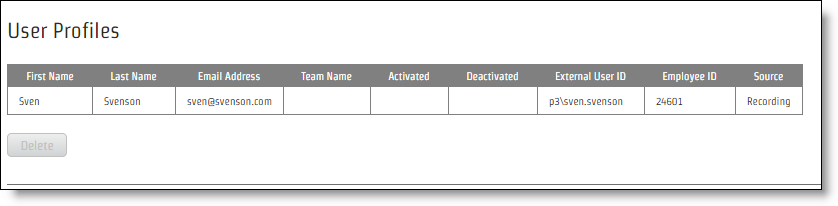
- Populates any of the following fields in the Recording user profile whose equivalent properties are configured in AD: First Name, Last Name, Email Address, External User ID, and Employee ID.
- Disables editing the Windows Login field on the User’s page.
-
-
If the Recording user profile has the correct precedence, Calabrio ONE transfers the values from the Recording user profile to the Calabrio ONE user.
NOTE If an Override user profile does not already exist, Calabrio ONE does not create one. This means that the values in the Recording user profile can overwrite the identity traits of a user who was manually created in Calabrio ONE, including first name, last name, user name, and employee ID. For more information about user profiles, see Manage user profiles for QM and Analytics and Configure global settings, “User Profile Precedence.”
Syncing matched users
When someone changes a matched user in AD, Calabrio ONE detects it and makes several changes. The following table summarizes these changes.
| Change in AD | Resulting Change in Calabrio ONE |
|---|---|
|
“First name” property is changed |
First name in the Recording user profile is changed. If the Recording user profile has the correct precedence, the user’s first name is also changed on the User’s page. |
|
“Last name” property is changed
|
Last name in the Recording user profile is changed. If the Recording user profile has the correct precedence, the user’s last name is also changed on the User’s page. |
|
“employeeID” property is changed |
Employee ID in the Recording user profile is changed. If the Recording user profile has the correct precedence, the user’s employee ID is also changed on the User’s page. |
|
“E-mail” property is changed |
Email address in the Recording user profile is changed. If the Recording user profile has the correct precedence, the user’s user name is also changed on the User’s page. |
|
“User logon name (pre-Windows 2000)” property is changed |
The user is unmatched. |
Unmatching synced users
If you no longer want a Calabrio ONE user to be linked with an AD user, you can unlink them. When a Calabrio ONE user is unlinked from an AD user, Calabrio ONE stops updating the user and the user’s Recording user profile when properties are changed in AD, and it enables the user’s Windows login for editing.
Unmatching a Calabrio ONE user does not delete the Recording user profile or delete any of the values stored in it, nor does it prevent the Calabrio ONE user from being matched with the AD user again the next time that sync runs. To permanently prevent Calabrio ONE from matching users, you must also change the Calabrio ONE user before sync runs again so that the Calabrio ONE user no longer has the same identity (as determined by the matching property that is currently selected) as the AD user.
Field descriptions
The fields on the Active Directory Configuration page are described below.
 Active Directory Authentication
| Field | Description |
|---|---|
|
Domain Name |
The domain of AD. This domain must be unique among any other AD domains. This domain must also match the domain of a user’s Windows login as configured in the Windows Login field on the Manage users page. |
|
Host Name |
The host name or IP address of the AD server. |
|
Port |
The port used to access the AD server. The default is port 389, or 636 if you are using SSL. The Calabrio ONE server must allow socket communication on this port to be able to access the AD server for user authentication. |
|
User Name |
The Windows login of a user with read access to the AD database. This user name is used to verify configuration information and validate user paths. |
|
Password |
The password for the user with read access to the AD database. |
|
Authentication Enabled |
Select this check box to enable AD authentication. Leave this check box cleared if you are using AD sync only. |
|
Use SSL |
Select this check box to use Secure Socket Layer (SSL) for the connection to the AD server. Selecting this option changes the default port number in the Port field. |
|
Certificate |
(Appears when you select Use SSL) The certificate that provides the AD identity and public key for SSL communication. Contact your AD administrator for the location of the certificate for AD. In many cases, this certificate is issued by the Certificate Authority on the AD machine. |
Active Directory Sync
| Field | Description |
|---|---|
| Root DN |
The domain component of the distinguished name of the organizational unit that stores the AD users who you want to sync with Calabrio ONE users. EXAMPLE
You want to sync AD users who are stored in an organizational unit that has the following distinguished name:
You enter |
| Organizational Units |
The distinguished name of the organizational unit that stores the AD users, minus the domain component. To specify multiple organizational units in the same domain, separate their distinguished names (minus the domain component) with a semicolon. EXAMPLE
You want to sync AD users who are stored in an organizational unit (Agents) that has the following distinguished name:
You enter the following text in the Organizational Units field:
Then, you decide you want to also sync AD users who are stored in another organizational unit, Supervisors. This organizational unit is in the same domain, and it has the following distinguished name:
You edit the text in the Organizational Units so that it reads as follows:
The table on the Active Directory Sync page contains all AD users who are located in the organizational units that you designate, both those who are matched with Calabrio ONE users and those who are not. See Review Active Directory sync results for QM, Analytics, Insights, and Performance Management. |
|
Synchronization Interval (Minutes) |
The frequency in minutes that Calabrio ONE syncs with AD. Calabrio ONE also updates the table on the Active Directory Sync page according to this interval. The minimum is 10 minutes. |
|
User Profile Matching Property |
The matching property or properties that Calabrio ONE uses to determine whether a Calabrio ONE user and an AD user have the same identity. If you select Default, Calabrio ONE matches users with the Default matching property only. If you select First Name / Last Name, Employee ID, or Email, Calabrio ONE first matches users with the Default matching property, then matches users with the selected matching property. Changing the matching property does not unmatch users who are already matched. |