

Configure global settings
Use the Global Settings page to configure aspects of the system that apply to all users and applications.
Prerequisites
You have at least one of the following permissions:
- Administer Tenant
- Administer Encryption Keys (gives you access to the Encryption Key section)
- Administer Data Clients
Page location
Application Management > Global > Administration > Global Settings
 Session Timeout (in minutes)
(Cloud only) Users are automatically logged out after a period of inactivity. The Session Timeout field lets you enter the length of time in minutes that a session should be idle before the user is automatically logged out. The default value is 60 minutes. The maximum value is 1440 minutes, which is 24 hours. Numeric characters only. Letters and special characters are not permitted. Any change in this setting takes place the next time a user logs in or refreshes a page.
NOTE If a user opens Calabrio ONE in multiple windows, the timeout duration applies separately to each window.
Automatic User Creation
The Automatic User Creation check box controls whether new Calabrio ONE users are created when employees in your contact center log in to a PC where the Smart Desktop is installed.
- Cleared—(Default) New users are not created
- Selected—New users are created
BEST PRACTICE Most organizations should keep Enable Automated User Creation disabled. If you enable this setting, you risk duplicating users and then having to manually merge or delete the duplicated users. We recommend automatic user creation only for organizations that use end-point recording.
The following table describes what happens when a Windows user logs in to a PC where Smart Desktop is installed, depending on whether the Automatic User Creation check box is selected or cleared.
| Automatic User Creation check box configuration | Login is associated with an active Calabrio ONE user | Result in PC and Calabrio ONE |
|---|---|---|
|
Cleared |
Yes |
Calabrio ONE user is recorded by Smart Desktop as configured. |
|
Cleared |
No |
No new Calabrio ONE user is added. Nothing is recorded by the Smart Desktop. |
|
Selected |
Yes |
Calabrio ONE user is recorded by Smart Desktop as configured. |
|
Selected |
No |
New Calabrio ONE user with a Recording user profile is added. New Calabrio ONE user is recorded by Smart Desktop as configured. |
Client Auto Update
Select the Client Auto Update check box to enable automatic updates of Smart Desktop. When this feature is enabled, at log on and at random times between midnight and 1:00 AM, Smart Desktop compares versions with the version on the server and, if they are different, downloads the newer version and installs it to maintain compatibility. This feature is not supported when the Smart Desktop Client (SDC) is running on a server version of Windows. This includes VDI solutions that use a server OS to emulate an agent environment, such as Citrix, Amazon Workspace, and so on.
Select Recording Format
Select the recording format to be used to record audio contacts.
VP8 Codec Video Encoding
Internet Explorer has been deprecated; therefore, you can leave this box unselected.
Generate Recording Encryption Key
This option appears only when your role has the Administer Encryption Keys permission enabled.
All stored recordings are encrypted. You can generate a new recording encryption key at any time using the Generate button. Existing recordings are not re-encrypted when you generate a new key. The new key takes effect the next time the clients are updated or reinstalled.
The new encryption key is displayed when you generate it. This key can encrypt and decrypt your recording files, so be sure to keep this key in a safe place.
In cloud deployments, the available encryption method is RSA-2048 (with asymmetric keys) and AES-256 for media recorded by Calabrio ONE.
Time Zone
Select the time zone to be used as the default time zone for the customer.
Default Language
Select the language to be used as the default language for the customer. This language can be overridden by an individual user selecting a custom language when logging in.
User Profile Precedence
You can change the precedence of user profiles from external sources (ACD and Recording) by reordering them in the User Profile Precedence table.
NOTE Override user profiles have the highest precedence by default. You cannot lower this precedence. If you want to identify a user with the values stored in an ACD or Recording user profile instead of the values stored in an Override use profile, you must manually delete that user’s Override user profile.
This reordering does the following:
- It changes the order of the user profiles in the User Profiles table on the Users page.
- If a user has two user profiles with different values in any field, it can also change which value Calabrio ONE chooses to identify that user.
BEST PRACTICE Reordering the precedence of user profiles affects every user who has those user profiles. Set the precedence of user profiles once, when you first configure Calabrio ONE.
User profile precedence reordering example
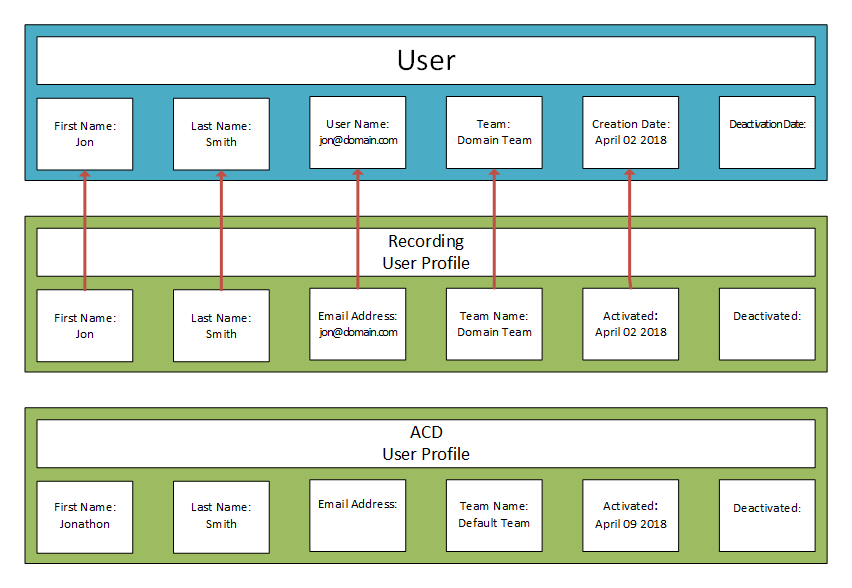
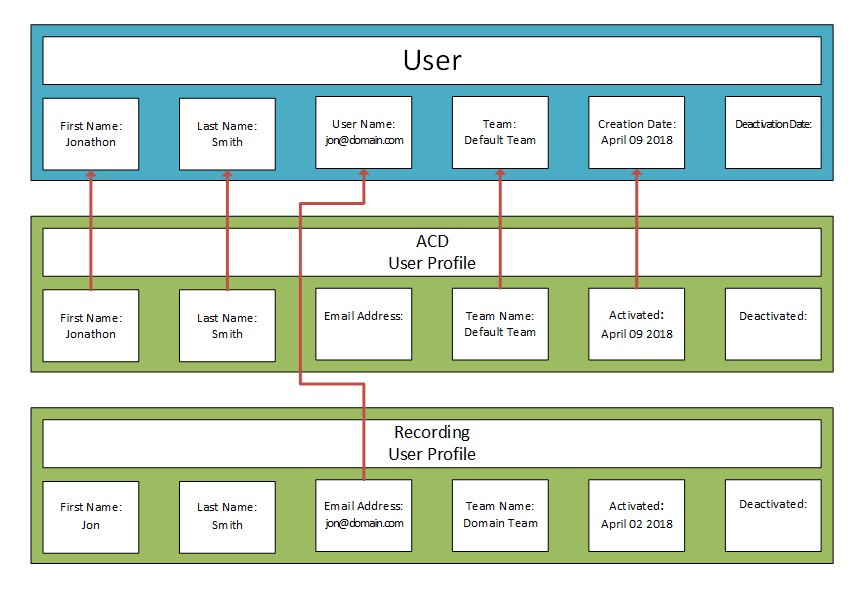
The following images show how a Calabrio ONE user’s identity is modified when the precedence of that user’s user profiles is reordered.
In the first image, the Recording user profile has a higher precedence than the ACD user profile, so Calabrio ONE selects values for most fields from the Recording user profile.
In the second image, the user profiles have been reordered so that the ACD user profile has a higher precedence than the Recording user profile. Now, Calabrio ONE selects values for most fields from the ACD user profile. This reordering changes the user’s first name, team, and creation date.
The precedence of user profiles does not affect which value is selected from the External User ID field, even if a user has both a Recording user profile and an ACD user profile. Calabrio ONE maps the External User ID from the Recording user profile to the user’s Windows Login, and it maps the External User ID from the ACD user profile to the user’s ACD ID.
Tenant UUID (read only)
A UUID (Universally Unique Identifier) is thirty-six character string unique to your tenant account.
Tenant Subdomain URL (read only)
The unique subdomain-based URL for your tenant account. A subdomain is the part of a URL that comes before the main domain name. Your subdomain-based URL is formatted as follows.
[placeholder].calabrio.one
Where [placeholder] is the unique subdomain for your organization's tenant account.
See Log in to Calabrio ONE with your subdomain URL for more details on your subdomain-based URL.
Related topics