

Manage user profiles for QM and Analytics
User profiles contain several fields (including first name, last name, and external ID) that summarize a user’s identity in external sources such as an ACD, a PC with Smart Desktop, or Active Directory. When a Calabrio ONE user is added from an external source, Calabrio ONE selects values from these fields and transfers that identity to the new Calabrio ONE user.
There are three categories of user profiles:
A single Calabrio ONE user can have all three user profiles at once. However, a user cannot have more than one ACD user profile, even if the user is merged with another user who has an ACD user profile (see Merge users for QM, Analytics, Insights, and Performance Management).
User profiles have “precedence.” Their importance is ranked in the User Profile table from highest (top) to lowest (bottom). When a user has more than one user profile, and those user profiles contain conflicting values in the same field, this precedence determines which values Calabrio ONE selects to identify that user in Calabrio ONE (see User profiles example).
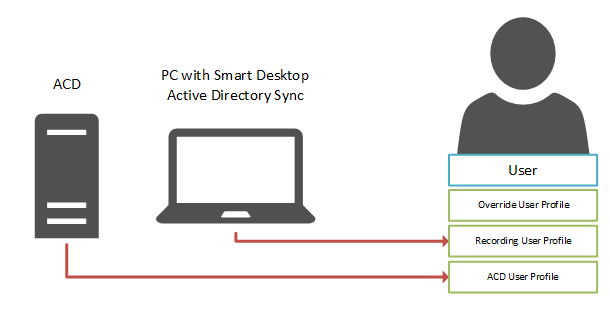
ACD user profiles
Users who are added through syncing with an ACD have ACD user profiles. An ACD user profile summarizes a user’s identity in the ACD and transfers that identity to the associated Calabrio ONE user.
When changes are made to a user in the ACD, the values in the ACD user profile of the associated Calabrio ONE user are updated the next time that sync occurs. These changes are also transferred to the Calabrio ONE user, unless the Calabrio ONE user has another user profile (Recording or Override) that has a higher precedence and contains conflicting values in one or more fields.
Calabrio ONE creates a separate ACD user profile for each ACD that it imports users from. It distinguishes multiple ACD user profiles by appending the name of the ACD (as entered on the ACD Configuration page) to the user profile source.
An ACD user profile can have a higher or a lower precedence than another ACD user profile or a Recording user profile. This precedence can be changed in the User Profile Precedence table on the Global Settings page (see Configure global settings). ACD user profiles cannot have a higher precedence than Override user profiles.
Recording user profiles
A Recording user profile summarizes a user’s identity in Active Directory and transfers that identity to the associated Calabrio ONE user.
Recording user profiles are added in the following situations:
- A new user is added by logging in to a PC with Smart Desktop
- An existing user is synced with Active Directory
- A new or existing user is given a Windows login
A Recording user profile can have a higher or a lower precedence than an ACD user profile. This precedence can be changed in the User Profile Precedence table on the Global Settings page (see Configure global settings). Recording user profiles cannot have a higher precedence than Override user profiles.
Override user profiles
An Override user profile preserves any changes that you make to users whose identities are created from ACD or Recording user profiles, ensuring that the values you enter in Calabrio ONE replace (or “override”) those imported from the ACD, PC with Smart Desktop, or Active Directory.
A user has an Override user profile after any of the following occur:
-
The user already has a Recording or an ACD user profile, and you edit one of the values that came from one of these user profiles.
NOTE You cannot edit the first name or last name of a user who is synced with an ACD. If the ACD syncs the relationship between users and teams, you cannot edit the team, either.
-
You merge a user that you manually created in Calabrio ONE with a user who has a Recording or an ACD user profile.
NOTE Calabrio ONE removes any existing override user profiles from both the primary user and the secondary user before they are merged. For more information about merging users, see Merge users for QM, Analytics, Insights, and Performance Management.
- You update an existing user through user import.
A user cannot have an Override user profile only.
Override user profiles have the highest precedence by default. You cannot lower this precedence. If you want to identify a user with the values stored in an ACD or Recording user profile instead of the values stored in an Override use profile, you must manually delete that user’s Override user profile.
User profiles example
The following image shows how a Calabrio ONE user’s identity is created from the values contained in three user profiles. The user profiles are ranked according to their precedence, as they are in the User Profiles table: from highest (Override) to lowest (Recording). To create the Calabrio ONE user’s identity, Calabrio ONE selects the first non-blank value for each field from the profile with the highest precedence.
NOTE The precedence of user profiles does not affect which value is selected from the External User ID field, even if a user has both a Recording user profile and an ACD user profile. Calabrio ONE maps the External User ID from the Recording user profile to the user’s Windows Login, and it maps the External User ID from the ACD user profile to the user’s ACD ID.

If you want to change the precedence of the ACD and Recording user profiles, you can rearrange them in the User Profile Precedence table on the Global Settings page (see Configure global settings).
BEST PRACTICE Reordering the precedence of user profiles affects every user who has those user profiles. Set the precedence of user profiles once, when you first configure Calabrio ONE.
Field descriptions
The following fields appear in the User Profiles table. All fields are read-only.
NOTE The values contained in an ACD user profile depend on the ACD. Not all ACD user profiles contain values for all fields.
| Field | Description |
|---|---|
| First Name |
ACD and Recording—The first name of the user in the external source. Override—The first name of a user who was created in Calabrio ONE, not added from an external source. |
| Last Name |
ACD and Recording—The last name of the user in the external source. Override—The last name of a user who was created in Calabrio ONE, not added from an external source. |
| Email Address |
ACD and Recording—The email address of the user in the external source. Override—The email address that was entered and saved for the user on the Users page. |
| Team Name |
ACD—In ACDs that sync the relationship between users and teams , the team of the user in the ACD. In ACDs that do not sync the relationship between users and teams, the default team. Recording—The default team. Override—The name of the team that was selected and saved for the user on the Users page. |
| Activated |
ACD and Recording—The date that the user was added to Calabrio ONE from the external source. Override—The date that a user who was created in Calabrio ONE, not added from an external source, was activated. |
| Deactivated |
ACD and Recording—The date that the user was deactivated or deleted in the external source. Override—The date that the user was deactivated in Calabrio ONE. |
| External User ID |
ACD—The unique identifier of the user in the ACD. Recording—The user’s Windows login credentials. Override—The ACD ID of a user who was created in Calabrio ONE, not added from an external source. |
| Source |
The origin of the user profile: ACD, Recording, or Override. |