

Select what people without scope see in Performance Management
For most users, the information they see in Performance Management is based on their scope, which is set on the Users page in Calabrio ONE. However, some people in your organization might not have scope assigned but might still need to see information about other people in Performance Management. On the KPI Data Visibility page, you can select the information that is visible in Performance Management for these kinds of users. This setting applies to all of these users, even any that you don't have scope over.
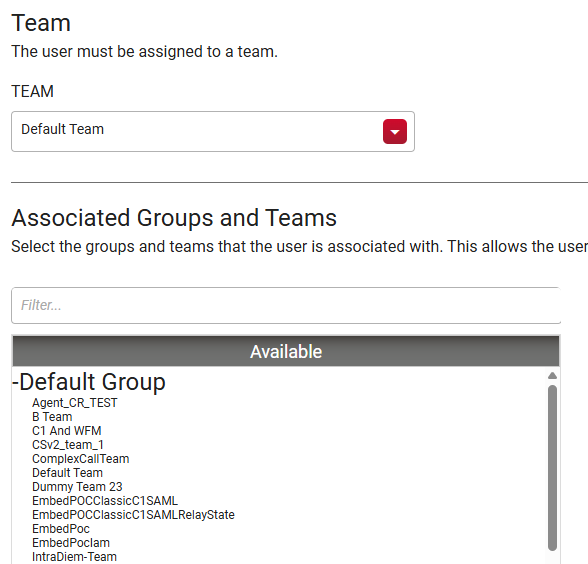
To see a user's scope, go to Application Management > Global > User Configuration > Users and select the user. The KPI Data Visibility setting applies to people whose user profiles look like the image below, with a team selected from the Team drop-down list but no groups or teams selected in the Associated Groups and Teams field.
Prerequisites
- Your organization's Calabrio ONE account is not hosted in Calabrio's South Africa realm (za1.calabriocloud.com). Performance Management is not available to accounts in the ZA1 realm.
- Your organization has enabled the new login experience. See Log in to Calabrio ONE with your subdomain URL for more information.
- You have the Administer Performance Management Essentials permission.
Page location
Performance Management > Settings > Configuration > KPI data visibility
Procedure
Assign the level of data accessible to people without scope
-
Select an option from the Select KPI access level list:
- Team-level aggregate KPIs only—Users can see team-level performance data for the team they are assigned to.
- Team and group-level aggregate KPIs—Users can see team- and group-level performance data for the team and group they are assigned to.
- Personal scores only—Users can see only their own performance data.
- Click Save configuration.
Related topics