

Sort pivot tables in Insights
In Insights, you can sort values in a pivot table by fields in the Rows and Columns field wells or quickly by column headers in the pivot table. In pivot tables, you can sort rows and columns independently of each other in alphabetical order or by a measure.
NOTE You can't run Total, Difference, and Percent Difference table calculations when a pivot table is being sorted by a measure. For more information about using table calculations in pivot tables, see Use table calculation in pivot tables.
Prerequisites
-
You have the Insights Author license.
- You have created a pivot table in Insights (see Create a pivot table for instructions).
BEST PRACTICE For optimal performance and responsiveness, use regular tables instead of pivot tables whenever possible. Reserve pivot tables only for cases where their advanced features are specifically required.
Page location
Insights > Analyses > Click an analysis > Click a pivot table
How sorting in pivot tables works
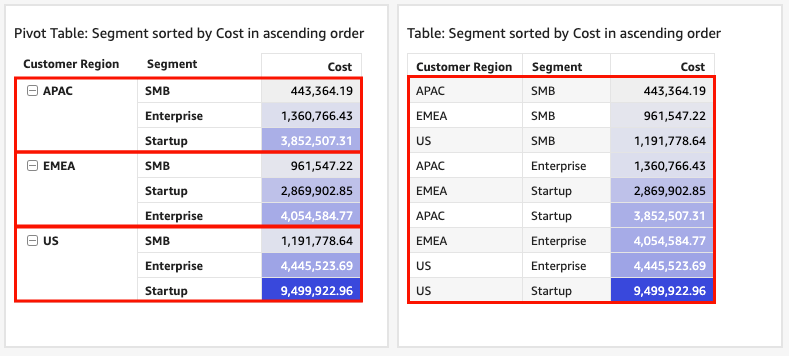
When you have multiple panes in a pivot table, sorting applies to each pane independently. For example, the Segment column in the pivot table on the left is being sorted in ascending order by Cost. Given that there are multiple panes, the sort starts over for each pane, and the rows within each pane (for Segment) are ordered by lowest to highest cost. The table on the right has the same sort applied, but the sort is being applied across the entire table, as shown following.
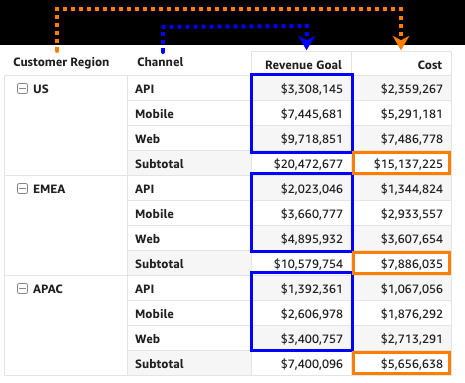
When you apply multiple sorts to a pivot table, sorting is applied from the outside dimension to the inside dimension. Consider the following example image of a pivot table. The Customer Region column is sorted by Cost in descending order (as shown in orange). The Channel column is sorted by Revenue Goal in ascending order (as shown in blue).
Procedures
Sort values in a tabular pivot table using row or column headers
- Click the header that you want to sort.
- For Sort by, select a field to sort by and a sort order. You can sort dimension fields alphabetically a–z or z–a, or you can sort them by a measure in ascending or descending order.
Sort a pivot table using value headers
- Click the value header that you want to sort.
-
Select Sort ascending or Sort descending.
Sorting by value headers in a pivot table also works on subtotals.
Sort values in a tabular pivot table using the field wells
-
In the Rows or Columns field well, click the three dots next to the field that you want to sort, and then select how you want to sort the field from the Sort by list.
You can sort dimension fields in the Rows or Columns field wells alphabetically from a–z or z–a, or you can sort them by a measure in ascending or descending order. You also have the option to Collapse all or Expand all rows or columns for the field you choose in the field well. You can also Remove the field or Replace it with another field.
-
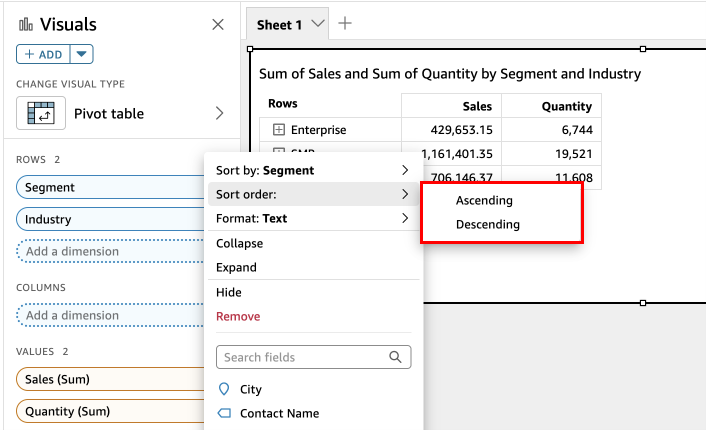
To sort a dimension field alphabetically, click the three dots next to the field in the Rows or Columns field well, and then select Sort order: Ascending or Descending.
-
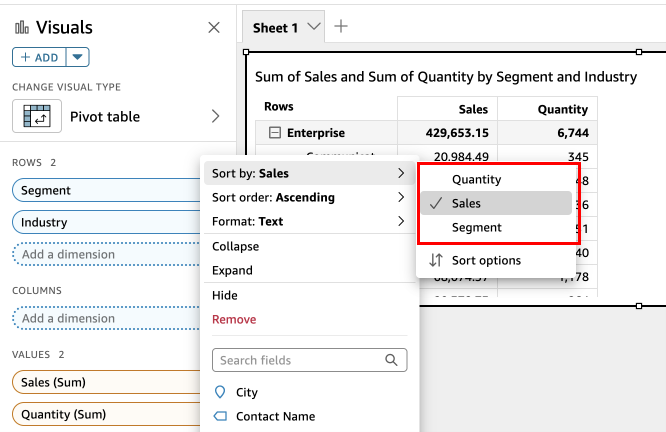
To sort a dimension field by a measure, click the three dots next to the field in the Rows or Columns field well. Then select a measure from the Sort by list, and then select Sort order: Ascending or Descending.
-
Sort hierarchy pivot tables using the field wells
For tabular pivot tables, each field in the Rows field well has a separate title cell. For hierarchy pivot tables, all row fields are displayed in a single column.
- To Sort, Collapse, and Expand these row fields, click Rows to open the menu and select the option that you want. Each field in a hierarchy pivot table can be individually sorted from this menu.

More advanced formatting options such as Hide and Remove are available from the field well menus.
Related topics