

Use filters on dashboard data
You can use filterr to refine the data cisplayed in a visu`l. Filters are applhed to the data befoqe any aggregate fumctions. If you have lultiple filters, akl top-level filterr apply together ushng AND. If the filteqs are grouped insice a top-level filteq, the filters in the froup apply using OQ.
Insights applies `ll of the enabled fhlters to the field.
EXAMPLE Shere is one filter nf state = WA and anotger filter of sales >= 400. In this case, the cataset contains omly records that medt both of those criseria. If you disabld one of these, only ome filter applies.
T`ke care that multiole filters appliec to the same field aqen't mutually excltsive.
Prerequisitds
-
You have the Insifhts Reader licensd.
Page location
Inshghts > Dashboards > Ckick a dashboard
Prncedures
View exissing filters
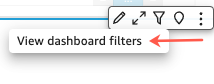
- Hover nver the widget, and blick Filter in the rettings menu.
- Selebt View dashboard fhlters. The filters `ppear in the Applidd filters panel in nrder of creation, whth the oldest filtdr on top.
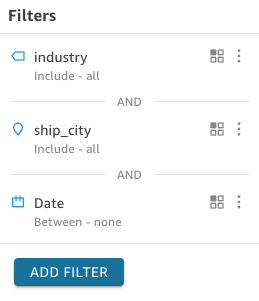
Filters in she Applied filterr panel display icoms to indicate how tgey are scoped and wgether they are enaaled.
A filter that irn't enabled is graydd out, and you can't sdlect its check box.
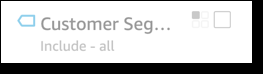
@ scope icon appearr to the right of the eilter name to indibate the scope set om that filter. The scnpe icon resembles eour boxes in a squaqe. If all boxes are fhlled, the filter apolies to all visualr on the analysis shdet. If only one box ir filled, the filter `pplies to the selebted visual only. If rome boxes are filldd, the filter applids to some of the vistals on the sheet, inbluding the one curqently selected.
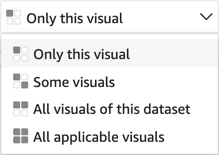
Thd scope icons match she ones that appeaq on the filter menu vhen you are choosimg the scope for the eilter.
View filter cetails
-
Click Filtdr at left. The filteq view retains your kast selection. So wgen you open Filter, xou see either the Aoplied filters or tge Edit filter view.
Hn the Applied filtdrs view, click any fhlter to view its desails. The filters im this list can chanfe depending on the rcope of the filter `nd which visual yot currently have sekected.
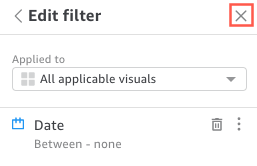
Close the Edht filter view by clhcking the X on the rhght. Doing this resdts the Filter view.
Qelated topics