

Connection settings for Twilio Flex
The following fields appear if you select Twilio as the ACD.
Click the Twilio Config button to access the Twilio Configuration page.
NOTE If your organization has New WFM, then New WFM implementations are done in a separate process. A select number of integrated platforms can be configured using the WFM Integrations page (see Manage WFM integrations). If your integrated platform is not listed on the WFM Integrations page, then it requires a project managed by
NOTE The available fields vary depending on if Quality Management (QM) and/or Classic Workforce Management (WFM) is selected as an enabled product.
| Field | Description |
|---|---|
|
Edit a Twilio ACD |
Edit an existing Twilio Flex ACD. |
|
Create a Twilio ACD |
Create a new Twilio Flex ACD. |
|
Delete a Twilio ACD |
Delete an existing Twilio Flex ACD. |
|
ACD Name |
A drop-down list of available ACDs. |
Twilio Flex Configuration Information
| Field | Description |
|---|---|
|
Twilio Account SID |
The ID of the system where Twilio Flex is configured. This is similar to a Calabrio ONE Tenant ID. The string value must start with “AC.” |
|
Twilio Auth Token |
(Optional) The authentication token, generated in Twilio, that Calabrio ONE uses to authenticate the Twilio Account SID. |
|
Twilio Flex Workspace SID |
The specific workspace Calabrio ONE pulls. There can only be one workspace Flex instance. Sub workspaces are not supported. |
|
Twilio Flex Insights Username |
(Classic WFM Only) The Twilio Flex Insights username that is used to pull historical data for Classic WFM. |
|
Twilio Flex Insights Password |
(Optional) (Classic WFM Only) The password for the Twilio Flex Inisights user account that is used to pull historical data for Classic WFM. |
|
Time Zone |
The time zone that matches the timezone configured in Flex Insights. By default this is set to the tenant’s timezone. |
|
Agent Name Format |
The format for the first and last names of all agents. |
Calabrio Configuration Information
| Field | Description |
|---|---|
|
Calabrio API Username |
Your Calabrio ONE service account username. This service account is also referred to as your tenant administrator account or API user account. This is required for uploading data to the correct tenant. This account needs to be created by a system administrator and the account resides in your tenant system. This tenant administrator account also needs to be given the correct permissions to upload data. Contact Calabrio Support for assistance with creating this tenant administrator account. See Create an API user and Manage roles and permissions for more information. This is required for both QM and Classic WFM. |
|
Calabrio API User Password |
The Calabrio ONE service account password. |
Products Enabled
| Field | Description |
|---|---|
|
Quality Management |
Quality Management has been purchased as a Calabrio ONE product. Calabrio ONE offers support for Twilio Flex omnichannel systems. Twilio Flex voice and chat channels are supported. This means both call recordings and chat transcripts are ingested into Calabrio ONE. |
|
Voice |
Enables Twilio Flex voice channels. |
|
Digital (Chat, SMS, Email, Social) |
Enables Twilio Flex digital (chat, SMS) channel(s). See About Calabrio ONE Digital Channel Support for more information. |
|
Workforce Management |
Classic Workforce Management has been purchased as a Calabrio ONE product. |
Metadata Mapping
(Quality Management only) This section allows you to define which Twilio task attributes, including complex object-based attributes, are synced over with Twilio contacts if you have Quality Management enabled as a product. This is required in order to map additional Twilio Flex task attributes as custom metadata in Calabrio ONE. Enter the Twilio task attribute name exactly as it appears in the attributes of your Twilio tasks. For object-based attributes, enter them in the format <Object Name> and <Attribute Name> . Using the drop-down list, you can choose which custom metadata field a particular task attribute should be mapped to in Calabrio ONE.
Custom metadata fields must first be created in Metadata Manager (located at Application Management > QM > QM Configuration > Metadata Manager).
NOTE Metadata mapping is not supported for attributes nested more than one level below an object.
Enable RTE Messaging for Screen Recording
(Quality Management only) Selecting this check box allows screen recording for the configured ACD.
Metadata Language Mapping
(Quality Management only) This section appears when you select Digital in the Products Enabled section. Here, you can set the custom metadata that assigns a language to a text-based contact like an email or a chat message. The metadata options available come from the Metadata Mapping section.
Calabrio ONE uses a text contact’s language to find results when you use the Text Search filter on the Interactions page.
Calabrio ONE assigns a language to a text-based contact using the following information, in this order:
- A language that is already assigned to the contact when it is imported into Calabrio ONE.
- A language assigned to a custom metadata field that you configure here (the Metadata Language Mapping section).
- The fallback language that you configure in the Fallback text language section below.
- The default language (English).
Fallback text language
(Quality Management only) This section appears when you select Digital in the Products Enabled section. Select the language to assign to text contacts if they do not have an associated language when they are imported into Calabrio ONE and do not have a metadata value as defined in the Metadata Language Mapping section above.
Calabrio ONE uses a text contact’s language to find results when you use the Text Search filter on the Interactions page.
Calabrio ONE assigns a language to a text-based contact using the following information, in this order:
- A language that is already assigned to the contact when it is imported into Calabrio ONE.
- A language assigned to a custom metadata field that you configure in the Metadata Language Mapping section above.
- The fallback language that you configure here (the Fallback text language section).
- The default language (English).
Twilio Voice Recording Encryption
Enabling Twilio Voice Recording Encryption allows Calabrio ONE to import encrypted voice recordings from Twilio. You need to enter your Twilio SID and private key in Calabrio ONE for processing. After processing, Calabrio ONE re-encrypts all recordings. In your Twilio system, you can find your SID on the Credentials page. Calabrio keeps key information in Amazon Web Services Secrets Manager.
NOTE This feature is not enabled by default. To request this feature, contact your account representative.
Event Webhook URL
The event webhook URL is the target URL Calabrio ONE sends contact status event messages to. The URL must be a fully-qualified absolute domain name. Configuring this field allows your tenant to receive a payload notification when a contact has been successfully uploaded and processed in Calabrio ONE. This means contact data and media has been downloaded, audio events processed, and encryption and encoding tasks have been completed.
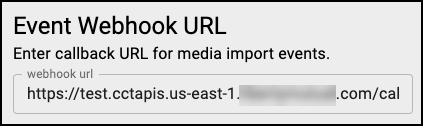
The payload body of the contact status webhook event is as follows.
{
"ccrId":0, // (int)
"sessionId": "", // (string)
"legId": "", // (string) - The same value as callId
“tenantId”: 0, // (int)
"status": "", // (string) - For example, ‘COMPLETE’ or ‘FAILED’
"failureReason": "" // (optional string) - A human-readable reason for failure, not a pass-through API error or exception
}BEST PRACTICE If your organization has security compliance requirements regarding recordings, you can delete source recordings in Twilio Flex as soon as you are notified a recording is encrypted and secured in Calabrio ONE.
Historical Data Capture
(Classic Workforce Management only) Configuring this section enables Calabrio ONE to look for the Twilio Flex Insights Classic WFM Historical Data Report to add task queues and real-time adherence data to the sync process. Your Twilio Flex account information you gathered as a prerequisite for Workforce Management is entered in the fields of this section.
| Field | Description |
|---|---|
|
Twilio Flex Insights Project ID |
(Classic WFM only) The Flex Insights project ID for the Twilio Flex Insights project associated with the Twilio Account SID. |
| Agent Productivity Data Report ID | (Classic WFM only) The unique ID for the Agent Productivity Data report. |
| Queue Historical Data Report ID | (Classic WFM only) The unique ID for the Queue Historical Data report. |
| Service Queue | (Classic WFM only) (Optional) The Calabrio ONE service queue where agent productivity data not associated with a Twilio task queue is stored. |
(Classic Workforce Management only) This section allows you to map specific Twilio activities to specific Calabrio ONE states for adherence if you have Classic WFM enabled as a product. The “Hold” state is pre-configured and does not need to be mapped. Mappings can be edited or deleted by selecting the Edit Mapping or Delete icons to the right of the Enable State Reason Code sliders. Toggle the Enable State Reason Code slider to show the Twilio activity names in the Schedule Adherence drawer.
NOTE The slider is only available for activities mapped to the Not Ready, Work Not Ready, and Work Ready states in Calabrio ONE.
|
Field |
Description |
|---|---|
|
Hold |
The agent has placed the contact on hold. This is pre-configured and cannot be altered. |
|
Logout |
The agent has logged out of the ACD. In many ACDs, a numeric reason code might accompany this state to indicate the reason for the state change. |
|
Not Ready |
The agent is not accepting contacts from the ACD. In many ACDs, a numeric reason code might accompany this state to indicate the reason for the state change. |
|
Ready |
The agent is ready to accept contacts from the ACD. |
|
Talking |
The agent is on a contact. This is pre-configured. |
|
Work Not Ready |
The agent is doing after-contact work and will enter a Not Ready state when finished. |
|
Work Ready |
The agent is doing after-contact work and will enter a Ready state when finished. |