

View the overview of a chat contact in the classic media player
IMPORTANT The information on this page is about the Text Map panel in the classic media player. For information about the Text Map panel in the new media player, go here: Read a chat contact in the new media player
How do I know which version of the media player I have?
If you see the Switch to new media player button in the upper-right corner of the page, you are in the classic media player, and the information below applies to you. If you see the Return to classic button, you are in the new media player. Go here for information about the classic media player: Play contacts with the new media player. If you don't see either of these buttons, you are probably in the classic media player.
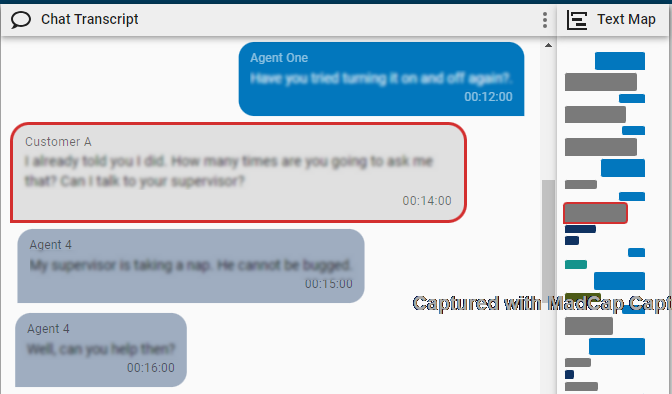
The Text Map panel contains colored rectangles that represent the messages in a chat contact. This panel gives you a high-level picture of the conversation without needing to scroll. The responses from the agent who handled the contact are on the right, and responses from the customer and any other agents involved in the conversation are on the left. The messages from each person in the conversation are a different color for up to four different participants. (If a conversation has five or more participants, the colors repeat.)

Prerequisites
- Your organization imports chat contacts into Calabrio ONE via a supported integration, not via the Generic Text Import API.
- You have the View Contacts permission.
Page location
Interactions > Double-click a contact > Text Map panel
Procedure
Skip to a specific spot in the conversation
Click a rectangle to move to the corresponding message in the conversation. The message is outlined in red in the Chat Transcript panel.
Related topics