

View data associated with a contact in the classic media player
IMPORTANT The information on this page is about the Contact Details panel in the classic media player. For information about the Contact Details window in the new media player, go here: View data associated with a contact in the new media player.
How do I know which version of the media player I have?
If you see the Switch to new media player button in the upper-right corner of the page, you are in the classic media player, and the information below applies to you.
If you see the Return to classic button, you are in the new media player. Go here for information about the classic media player: Play contacts with the new media player. If you don't see either of these buttons, you are probably in the classic media player.
The Details panel in the Media Player enables you to explore several categories of data associated with the contact. The sections available depend on your role, the contact type and contents, and the features enabled in Calabrio ONE.
Prerequisites
- Your organization has a QM or Call Recording license
- You have the View Contacts permission
Page location
Interactions > Double-click a contact > Details panel
 Associated Contacts
When multiple agents handle the same customer call (for example, when one agent transfers the call to another agent), Calabrio ONE creates a separate contact for each agent involved and gives these contacts the same associated contact ID. The Associated Contacts section displays such contacts, allowing you to see all segments of a call, from when it enters the contact center to when it ends.
A customer calls Agent A. Agent A transfers the customer to Agent B, and Agent B transfers the customer to Supervisor C. Calabrio ONE creates three separate contacts and gives them the same associated contact ID.
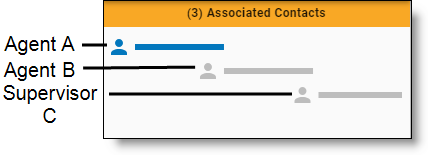
For further examples, see Watch the screen capture of a contact in the classic media player.
Calabrio ONE orders associated contacts chronologically and highlights the currently-loaded contact in blue. To load an associated contact, do either of the following:
- Click the associated contact that you want to load.
- Click the Previous or Next button in the Media Player (see Play contacts in the classic media player).
You can also hover over an associated contact to see a tooltip that contains further details.
NOTE Associated contacts might not align correctly. For example, the system clock time on each PC with Smart Desktop can vary if the desktops are not syncing to the same time server. The system clock time can also vary on each PC between syncs to the same time server.
You might not be able to play back some associated contacts. This is due to various reasons:
- They were deleted.
- They did not meet workflow criteria.
- They were under the minimum length.
With this type of contact, the energy bar associated with the contact is empty, and the recording is unavailable. You cannot listen to those segments of the call, but you can view them so you can follow how the call moved through the contact center. When you use the Next and Previous buttons to move through the list of contacts, the Media Player automatically skips contacts you cannot listen to.
NOTE You can only play back associated contacts that are within your scope. An error message appears for calls that are out of your scope.
Contact Information
The Contact Information section displays contact data. The data shown depends on the type of contact. Information for calls is different than information for emails, for example.
The following tables describe all possible contact data that can appear in the Contact Information section of the Details panel. Each table orders contact data alphabetically.
Contact
| Contact Data | Description |
|---|---|
|
Audio File Upload State |
The status of the contact’s audio file. Possible values for this field are as follows:
|
|
Called Number |
The direct inward dialing (DID) or Dialed Number Identification Service (DNIS) number of the phone that received the call. Displays “unknown” if the called number is unlisted or blocked. This field applies only to calls. |
|
Calling Number |
The caller ID or Automatic Number Identification (ANI) of the calling party. Displays “unknown” if the calling number is unlisted or blocked. This field applies only to calls. |
|
Channel |
The channel where the interaction occurred. This field appears if your organization uses a supported integration for social media contacts. The possible values for this field vary based on the types of social media your organization uses. |
|
Contact Direction |
The direction of the contact: inbound or outbound. |
|
Contact Duration |
The length of time between the call being answered and the call being dropped, including ring time and extended screen time (if any) in HH:MM:SS. The call duration is received from the signaling service. The call duration shown in the contacts table and the Media Player might not be the same due to the difference in “event duration” (the time between events) and “recording duration” (the duration within the actual recorded file). In these scenarios, the call duration would be different:
This field applies only to calls. |
|
Contact ID |
The conversation’s unique ID. |
|
Contact Type |
The contact type. The possible values for this field are:
|
|
Daily Workflow |
The name of the Daily Workflow associated with this contact (see Automate QM workflows). |
|
End of Interaction Workflow |
The name of the End of Interaction workflow associated with this contact. |
|
External Parties |
(Chat and SMS contacts only) The phone number, email address, or other identifier of the person who interacted with the agent. |
|
From Address |
(Email contacts only) The email addresses in the From field. This option is available only when Analytics is enabled. |
|
HR |
Indicates if the contact has been marked as an HR contact. |
|
Reason |
The reason the conversation was recorded. This reason is set in the recording rule (see Automate QM workflows). Possible values for this field are listed below. Each organization uses reasons differently, so the definition for each reason might vary based on how your organization assigns reasons.
|
|
Recording Type |
The recording type associated with this device. |
|
State |
The current evaluation state of the contact. The possible values for this field are:
|
|
Subject |
(Email contacts only) The wording in the Subject line. This information appears only when your organization uses both Quality Management and Analytics. |
|
Survey Name |
The name of a survey. |
|
Survey Score |
The score of a completed survey. |
|
To Address |
Filters email associated with non-call contacts based on the email addresses in the To field. This option is available only when Analytics is enabled. |
|
Training |
Indicates if the contact has been marked as a training contact. |
|
Video File Upload State |
The status of the video or audio file. Possible values for this field are:
|
Organization
| Contact Data | Description |
|---|---|
|
Agent ACD ID |
The ID of the agent in the ACD. |
|
First Name |
The agent’s first name. NOTE If the First Name, Last Name, Group and Team fields are blank, the recording is a root call. A root call is an unreconciled contact that appears as a QM archive contact. Once reconciled, the call is assigned a user (see How root calls and reconciliation work). |
|
Group |
The name of the group. |
|
Last Name |
The agent’s last name. |
|
Team |
The name of the team the agent belonged to at the time the contact was recorded. |
Evaluation
| Contact Data | Description |
|---|---|
|
Approved By |
The name of the person who approved the evaluation. You can see this information if one of these is true:
|
|
Calibrated |
Indicates if the contact has been marked for calibration. |
|
Date Evaluated |
The date when the contact was evaluated. This value appears if you are the evaluator or when the View Evaluator Details permission is enabled. If this permission is not enabled, the value ##### is displayed. NOTE The date and time used to calculate the Date Evaluated value is calculated using the Universal Time Coordinated (UTC) time plus or minus an offset value associated with your time zone. For example, 09/22/2019 2:00 AM UTC converts to 09/21/2019 9:00 PM Central Daylight Time (CDT). The Date Evaluated filter uses the UTC time of when the call is evaluated. That means, depending on your time zone, a call recorded on late in the evening in the CDT time zone on 09/21/2019 is filtered as a call that was recorded on 09/22/2019. If you search the recordings that occurred on 09/21/2019 using the Date Evaluated filter, you may also need to search the recordings for the previous or next day, depending on your time zone. |
|
Date Responded |
Date the agent responded to the evaluation. |
|
Evaluation Form |
The name of the evaluation or calibration form used to score the customer conversation. |
|
Evaluation Response |
Indicates the response status for the contact:
|
|
Evaluator Name |
The name of the evaluator or calibrator. You can see this information if one of these is true:
|
|
Score |
The evaluation score given to the contact. NOTE Calibration scores do not appear in this field. For calibration scores, use the Evaluation Calibration. |
Speech, Speech Fields (Contacts Table)
| Contact Data | Description |
|---|---|
|
% Hold |
The percentage of the call spent in a hold state. |
|
% Pause |
The percentage of the call spent in a pause state. |
|
% Silence |
The percentage of the call spent in a silence state (during which neither the caller or the agent are speaking). |
|
% Talk Over |
The percentage of the call spent in a talkover state (during which both the caller and the agent are speaking). |
|
Hold Events |
Number of detected hold events. |
|
Pause Events |
Number of detected pause events. |
|
Silence Events |
The number of detected silence events. |
|
Talk Over Events |
The number of detected talkover events. |
|
Total Hold Duration |
The total duration of hold time. Format = HH:MM:SS. |
|
Total Pause Duration |
The total duration of pause time. Format = HH:MM:SS. |
|
Total Silence Duration |
The total duration of silence time. Format = HH:MM:SS. |
|
Total Talk Over Duration |
The total duration of talkover time. Format = HH:MM:SS. |
Analytics
| Contact Data | Description |
|---|
Metadata, Custom Metadata (Contacts Table)
| Contact Data | Description |
|---|---|
|
Variable text |
The custom metadata available in Calabrio ONE varies by the configuration of your ACD and the Metadata Manager page. You can edit the values in custom metadata fields. See Edit custom metadata associated with a contact in the classic media player. |
Post-Call Survey
The Post-Call Survey section displays the results of a survey completed by the customer after the contact ends. Post-call survey data appears only when your system is configured to deliver surveys and the customer has submitted a response.
Related topics