

Listen to an audio contact in the classic media player
IMPORTANT The information on this page is about the Audio panel in the classic media player. For information about the Audio panel in the new media player, go here: Listen to an audio contact in the new media player
How do I know which version of the media player I have?
If you see the Switch to new media player button in the upper-right corner of the page, you are in the classic media player, and the information below applies to you. If you see the Return to classic button, you are in the new media player. Go here for information about the classic media player: Play contacts with the new media player. If you don't see either of these buttons, you are probably in the classic media player.
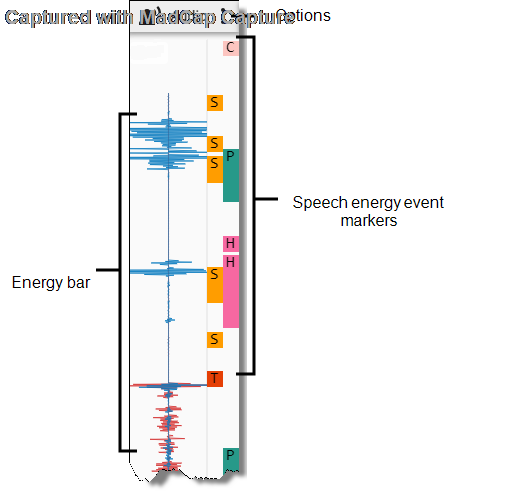
The Audio panel in the Media Player visualizes the audio recording.
Prerequisites
 This feature is also available to Calabrio GovSuite users.
- Your organization has the QM, CR, and Calabrio ONE Access licenses.
- You have the View Contacts permission.
- The contact’s Contact Type is “Call,” and its Contact Content includes “Has Voice.”
Page location
Interactions > Double-click a contact > Audio panel
Procedures
View speech activity
The energy bar shows where audio activity (the agent and customer speaking) occurred throughout the contact. You can drag the timeline slider to a place where the energy interests you and listen to that portion of the audio.
NOTE If an agent’s screen activity was recorded before a call started or after a call ended (for example, because of a Screen Recording Extension configuration), the energy bar is blank during that portion of the recording.
The color of the audio streams depends on the type of recording.
| Energy Bar | Recording Type | Description |
|---|---|---|
|
|
Stereo |
The inbound audio stream is blue. The outbound stream is red. |
|
|
Mono |
The audio stream is red. |


View events
Speech energy event markers label where Calabrio ONE detects significant audio events, such as where both the agent and the customer spoke at the same time.
Click an event marker to move the timeline slider to it, or hover over an event marker to see further details.
The following table describes all event markers.
| Icon | Type | Description |
|---|---|---|
|
|
Comment |
Someone commented on the evaluation while playing the contact. NOTE Comments left on evaluation forms that are in calibration mode do not appear as event markers. |
|
|
Hold |
The agent placed the call on hold. |
|
|
Pause |
The recording was paused because the agent did something that told Calabrio ONE to stop recording (see Identify websites and apps to be tracked by Analytics). |
|
|
Silence |
Neither the agent nor the customer was speaking (see About silence and talk over events). NOTE Brief background noises might appear as audio energy, but Calabrio ONE still considers those silence. |
|
|
Talk over |
Both the agent and the customer were speaking at the same time (see About silence and talk over events). |


Filter events
Click the Options icon to select the types of events that appear.
Related topics
- Play contacts in the classic media player
- Listen to an audio contact in the new media player
- About silence and talk over events—Learn more about how Calabrio ONE identifies silence and talk over.
- Identify websites and apps to be tracked by Analytics—Specify agent actions that tell Calabrio ONE to pause and resume recording.
- Configure QM global settings—Establish how long silence or talk over must happen for Calabrio ONE to mark it as an event.