

View changes in sentiment for a contact in the classic media player
IMPORTANT The information on this page is about the AI Sentiment panel in the classic media player. For information about sentiment in the new media player, go here: View the customer and agent sentiment for a contact in the new media player.
How do I know which version of the media player I have?
If you see the Switch to new media player button in the upper-right corner of the page, you are in the classic media player, and the information below applies to you.
If you see the Return to classic button, you are in the new media player. Go here for information about the classic media player: Play contacts with the new media player. If you don't see either of these buttons, you are probably in the classic media player.
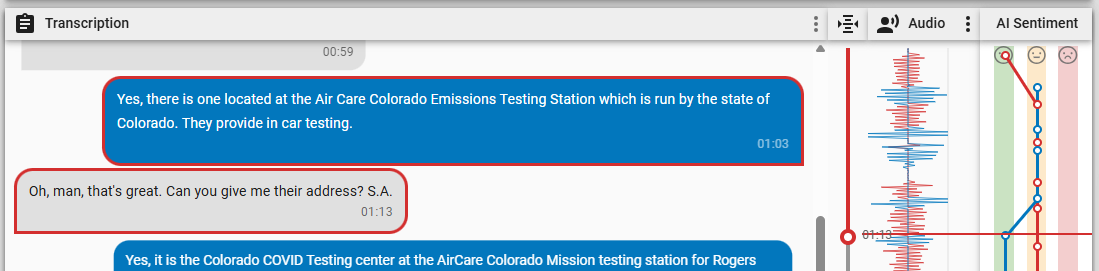
The AI Sentiment panel in the Media Player illustrates how agent and customer sentiment (emotion) changed over the course of a contact. The agent’s sentiment is red, and the customer’s sentiment is blue. Positive sentiment appears in the green stripe on the left. Neutral sentiment appears in the yellow stripe in the middle. Negative sentiment appears in the red stripe on the right.

The table below defines the different sentiments.
| Sentiment | Definition |
|---|---|
| Positive | The contact shows clear signs of satisfaction, resolution, or being a supportive and helpful conversation. These signs might include appreciative language, smooth issue resolution, or a generally upbeat interaction. |
| Neutral | The interaction is professional and factual throughout, with little emotional expression, neither strongly positive nor negative. Contacts with neutral sentiment are typically routine or transactional conversations. |
| Negative | The conversation reflects frustration, complaints, unresolved issues, or tension. It could include repeated expressions of dissatisfaction, escalations, or language that shows irritation or disappointment. |
Prerequisites
- Your organization has the Analytics Enterprise or the Analytics Enterprise Plus license.
- An administrator has created a Sentiment Analysis task with sentiment trend enabled (see Turn on Advanced Sentiment or Create Analytics tasks).
- The contact has a transcript. This transcript can be either the transcription of an audio contact or the text record of a chat or email exchange. The AI Sentiment panel is not currently available for text or SMS contacts.
- You have the View Contacts and View Sentiment permissions.
Page location
Interactions > Double-click a contact > AI Sentiment panel
Procedures
View a sentiment marker in the contact
-
Click a circle in the AI Sentiment panel. The AI Transcription panel, audio scrubber, Audio panel, and audio timestamp (next to the Play button) move to the corresponding part of the contact.
Related topics