

Freeze columns in table visuals
Freezing columns to your table visuals locks specific columns in place on screen. This allows essential information to remain visible while readers scroll across the table, giving them a constant reference point for key data or information as they interact with other parts of the table. All pinned columns are fixed to the far left side of the table and stay visible on screen at all times.
Prerequisites
-
You have the Insights Author license.
- You have created a table. See Use tables as visuals for instructions.
Page location
Insights > Analyses > Click an analysis > Click a table
Procedures
Freeze columns in a table
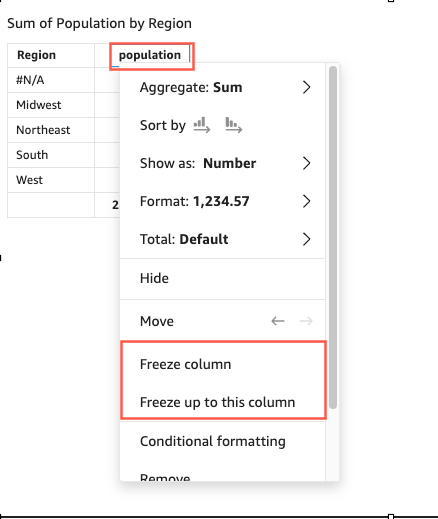
- Click the header for the column that you want to pin.
-
Choose one of the following options.
- To freeze only this column, select Freeze column. If the column was not the farthest left column in the table, it moves to that position.
- To freeze this column and all the columns to its left, select Freeze up to this column.
Adjust the order of frozen columns
- Click the header for the column you want to move.
- Click the Move arrows.
Unfreeze columns in a table
- Click the header for the column that you want to unfreeze.
-
Choose one of the following options.
- To unfreeze that column only, select Unfreeze column.
-
To unfreeze all frozen columns, select Unfreeze all columns.
Related topics