

Sort data in tables
You can sort up to ten columns in a single table.
Prerequisites
-
You have the Insights Author license.
- You have created a table. See Use tables as visuals for instructions.
Page location
Insights > Analyses > Click an analysis > Click a table
Procedures
Sort a single column
By default, new sorts are sorted in an ascending order. If you select a new column to sort by, the previous sort order is overridden.
There are three ways that you can sort a single column.
Option 1: Use a column header
- Click the header of the column that you want to sort.
- In the Sort by section, hover over the field that is currently listed and select the field that you want to sort by.
Option 2: Use the Sort visual menu
-
Click Sort visual in the upper-right corner of the table. The Sort visual window opens.
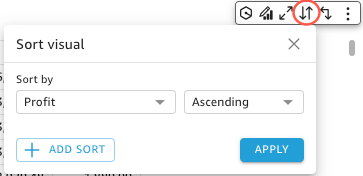
- Select the field you want to sort by from the Sort by drop-down list.
- Select Ascending or Descending.
- Click Apply.
Option 3: Use a field well
- In the Visuals panel > Group By field wells, click the three dots on the data field that you want to sort by.
- Hover over Sort by and select the field name.
Sort by multiple columns
-
Click Sort visual in the upper-right corner of the table. The Sort visual window opens.
- Select the first field that you want to sort by from the Sort by drop-down list.
- Click Add Sort.
- Select the second field that you want to sort by from the Then by drop-down list. You can add up to ten sorts to a table.
- Click Apply. Columns are sorted in the order that you added them.
Sort the table by a field that does not appear in the table
An off-visual sort sorts the values in a table by a field and aggregation that is a part of the dataset that the table uses but not in one of the table's field wells. You can configure one off-visual sort to a single table at a time.
- Click any column header in the table.
-
In the Sort by section, hover over the field that is currently listed and select Off-visual field. The Off-visual field panel opens.
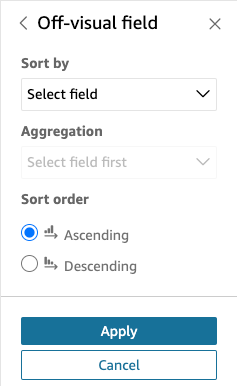
- Select the field that you want to sort by from the Sort by drop-down list.
- Select the aggregation you want to use from the Aggregation drop-down list.
- In the Sort order section, select Ascending or Descending.
- Click Apply. The table updates, and if you click Sort visual, the sort appears in the Sort visual window.
If you add an off-visual sort to a table that already has a single or multi-column sort, the off-visual sort overrides all other sorts. If you apply the off-visual sort first, you can add and reorder more sorts to the table.
Revert a table to its original state
-
Click Sort visual in the upper-right corner of the table. The Sort visual window opens.
- Click Reset.
Related topics