

Set up parameters in Insights
Use parameters in Insights to make dashboards more interactive and user-friendly. Parameters are named variables that act like placeholders for user input. When added to a dashboard, they let users control filters, calculations, or even navigate between dashboards, without needing to understand the technical details behind the scenes. For example, a parameter can power a drop-down list that changes what data the dashboard shows, or pass values between dashboards for deeper analysis. You can also add controls like lists, sliders, or text boxes to make these parameters accessible to users.
Prerequisites
-
You have the Insights Author license.
-
You have the Create Content permission.
- You have the View Content permission.
-
You have at least one of these permissions:
- View Analytics Data
- View QM Data
- View WFM Data
Page location
Insights > Analyses > Click an analysis
Procedures
Create a parameter
-
Click Parameters
 . The Parameters pane opens.
 -
Click +ADD. The Create new parameter window opens.
-
In the Name field, enter the Parameter name.
-
For Data type, select String, Integer, Number or Datetime, and then complete the following steps.
-
If you select String, Integer, or Number, do the following:
-
For Values, select Single value or Multiple values.
Select the single value option for parameters that can contain only one value. Select multiple values for parameters that can contain one or more values.
IMPORTANT Multivalue parameters can't be Datetime data types. They also don't support dynamic default values.
To switch an existing parameter between single and multiple values, delete and recreate the parameter.
-
For Static default value or Static multiple default values(when you select Multiple values), enter one or more values.
This type of static value is used during the first page load if a dynamic default value or URL parameter isn't provided.
-
(Optional) Select Show as blank by default.
NOTE Select this option to show the default value for multivalue lists as blank. This option only applies to multivalue parameters.
-
-
-
If you select Datetime, do the following:
-
For Time granularity, select from Day, Hour, Minute, or Second.
-
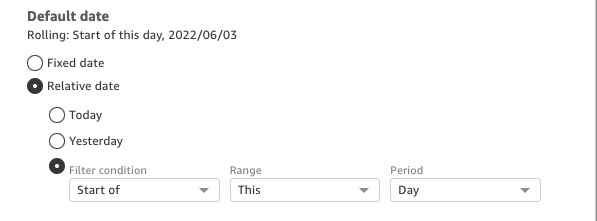
For Default date, select either Fixed date or Relative date, and then do the following:
-
If you select Fixed date, enter a date by using the date picker.
-
If you select Relative date, select a rolling date. You can select Today, Yesterday, or you can specify the Filter condition (Start of or End of), Range (This, Previous, Next, Last N, or Next N), and Period (Year, Quarter, Month, Week, or Day).
-
-
-
(Optional) Click Dynamic default to set a default that is user-specific.
A dynamic default is a per-user default value for the first page load of the dashboard. Use a dynamic default to create a personalized view for each user.
Calculated fields can't be used as dynamic defaults.
IMPORTANT This option only appears if you select a single value parameter. Multivalue parameters can't have dynamic defaults.
NOTE If you select a multivalue parameter, the screen changes to remove the default options. Instead, you see a box with the text Enter values you want to use for this control. You can enter multiple values in this box, each on a single line. These values are used as the default selected values in the parameter control. The values here are unioned with what you select to enter for the parameter control. For more information on parameter controls, see Using a control with a parameter in Insights.
-
(Optional) Set a reserved value to determine the value of the Select all value. The Set reserved value is only available when you select String, Integer, or Number. The reserved value of a parameter is the value that is assigned to a parameter when you choose Select all as its value. When you set up a specific reserved value for your parameter, that value is no longer considered a valid parameter value in your dataset. The reserved value can't be used in any parameter consumers, such as filters, controls, and calculated fields, and custom actions. Also, it does not appear in the parameter control list. You can select from Recommended value, Null, and Custom value. If you select Recommended value, the reserved value is set to the following values based on the value type:
-
Strings: "ALL_VALUES"
-
Numbers: "Long.MIN_VALUE"-9,223,372,036,854,775,808
-
"Integers: Int.MIN_VALUE"-2147483648
-
-
Click Create to complete creating the parameter.
Edit a parameter
-
To edit an existing parameter, click the three dots next to the parameter name, then click Edit parameter. In the Edit parameter window, make the necessary changes.
Related topics