

Use box plots
Prerequisites
-
You have the Insights Author license.
Page location
Insights > Analyses > Click an analysis
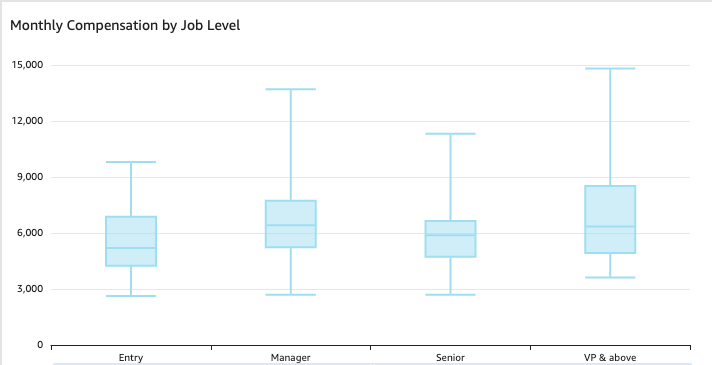
Box plots, also known as box and whisker plots, display data pooled from multiple sources into one visual, helping you make data-driven decisions. Use a box plot to visualize how data is distributed across an axis or over time, for example flights delayed over a seven-day time period. Typically, a box plot details information in quarters:
- Minimum – The lowest data point excluding outliers.
- Maximum – The highest data point excluding outliers.
- Median – The middle value of the dataset.
- First Quartile – The middle value between the smallest number and the median of the dataset. The first quartile doesn't include the minimum or the median.
- Third Quartile – The middle value between the largest number and the median of the dataset. The third quartile doesn't include the maximum or the median.
Outliers are extreme data points that aren't included in the calculation of a box plot's key values. Because outliers are calculated separately, their data points don't appear immediately after a box plot is created. Box plots display up to 10,000 data points. If a dataset contains more than 10,000 data points, a warning appears at the upper-right corner of the visual.
Box plots support some calculated fields, but not all. Any calculated field that uses a window function, for example avgOver, results in a SQL error.
The following screenshot shows a box plot.
Procedure
Create a basic box plot visual
- Click Visualize (the bar chart icon in the tool bar). The Visuals panel opens.
- Click Add.
-
Click the Box ploticon.

- Drag at least one measure from the Data panel into the Value field well.
- (Optional) Drag a dimension from the Data panel into the Group By field well. Box plots support up to five metrics and one group-by but don't render if duplicate metrics are supplied.
- (Optional) To add drill-down layers, drag at least one more dimension from the Data panel into the Group By field wells. For more information about adding drill-downs, see Adding drill-downs to visual data in Insights.
Related topics
- Formatting options available for each visual type in Insights—Learn about the features available with box plots
- Format a visual in Insights—Learn how to customize your box plot
- Add visuals to Insights analyses
- Visual types in Insights
- Customizing data presentation