

Configure KPIs
The Key Performance Indicators (KPIs) page is used to establish goals for the KPIs you want to make available for monitoring in a Data Explorer report or dashboard.
Prerequisites
- You have the Administer Tenant permission.
Page location
Application Management > Global > Administration > Key Performance Indicators (KPIs)
All KPIs have a default goal, but that goal can be very broad, so it might not add value in reporting without refining it by adding specific goals more appropriate for your contact center. When you add a goal to a KPI, you can further refine the goals for specific areas of your contact center, such as a group or team. For example, the Adherence % goal for Team A might be different from that for Team B, since they handle very different types of contacts. A KPI can have multiple goals, based on your unique requirements.
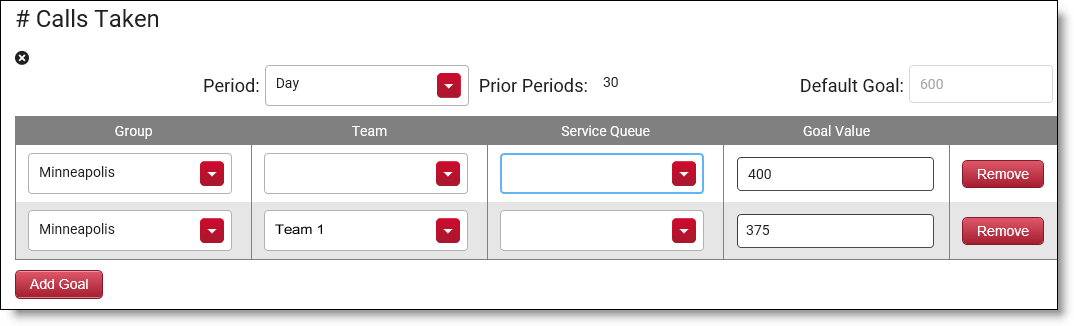
A KPI is hierarchical in nature. That is, when you set a goal and do not specify a group or team, the goal applies to all groups and teams in your entire contact center. If you specify a group, the goal applies only to that group and all teams that belong to it. If you specify both a group and a team, then that goal applies only to that team. A more specific goal overrides a less specific goal.
Group Minneapolis is comprised of Teams 1, 2, and 3. As shown in the graphic below, a goal of 400 calls taken per day has been set for the group and all its teams. However, Team 1 handles more complex issues, so a goal of 375 calls taken per day is set for Team 1 only. This goal overrides the goal set at the group level. Since no goals have been set specifically for Teams 2 and 3, they inherit the group’s goal of 400 calls taken per day.
The KPIs available for configuration are built into Data Explorer as a type of measure. See Create a Data Explorer report and Configure enterprise key performance indicators (KPIs) for more information.
Configure a KPI goal
- Select the KPI you want to configure from the Add KPI drop-down list, and then click Add KPI. The KPI is added to the page in alphabetical order with one blank row.
-
Complete the fields to configure the KPI goal. The only field required is Goal Value. All others are optional. Not all fields are available for every KPI.
Field Description Period
(Optional) Select the unit of time (“period”) for the KPI.
Prior Periods
(Optional) Enter the number of prior periods for the KPI. For example, if the period selected is “Day” and the prior periods entered is “30,” then the trend comparison of the KPI is for the prior 30 days.
Default Goal
(Read only) The default goal of the KPI. This value is set with the KPI in Data Explorer. The default goal can be very broad, so it might not add value in reporting without refining it by adding specific goals.
Group
(Optional) Select the group for the goal. The available groups are those configured on the Groups page (see Manage groups for QM, Analytics, Insights, and Performance Management.
Team
(Optional) Select the team for the goal. The available teams are those configured on the Teams page (see Manage teams for QM, Analytics, Insights, and Performance Management).
Form
(Optional) Select the evaluation form for the goal. The available forms are those configured on the Evaluation Form Manager page (see Manage evaluation forms).
Goal Value
(Required) Enter the goal for the KPI.
- If you want to add another goal for the KPI, click Add Goal. If you need to remove a goal row from the KPI, click Remove next to that row.
- When you have finished adding goals, click Save.
Remove a KPI from the page
-
Click the X icon beneath the KPI name to remove the KPI from the page. When you remove the KPI, it reverts to using its default goal in reporting.
NOTE If you remove every goal row from a KPI, the KPI is automatically removed from the page. A KPI must have at least one goal row to remain on the page.
Related topics
- Set WFM KPI targets for agents—Configure KPIs for New WFM