

Manage password on AVD
Reset your password or choose to change your password whenever you want. To ensure strong passwords, there is a password policy. The password policy is stated below.
NOTE Regardless of if you change or reset your password, it takes 30 minutes for the Active Directory to update the change.
Password policy
- 8 characters minimum and 256 characters maximum.
-
3 out of 4 of the following required.
- Lowercase characters.
- Uppercase characters.
- Numbers.
- Symbols.
- Characters allowed.
- A-Z
- a-z
- 0-9
- @ # $ % ^ & * - _ ! + = [ ] { } | \ : ' , . ? / ` ~ " ( ) ; < >
- Blank space
- When you change the password, you cannot reuse the last password.
- When you reset the password, you can reuse the last password.
NOTE Microsoft constantly analyzes security telemetry data to identify weak passwords. Terms that are often used as the basis for weak passwords are added to the global banned password list. If you choose as password that includes a term that is on their list, you'll see the message "We've seen that password too many times before. Choose something harder to guess." Go to Microsoft's website to read more about the global banned password list.
Procedures
Reset password
-
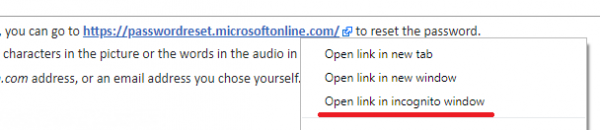
To reset your password, go to https://passwordreset.microsoftonline.com/
Right-click the link above and select to open in Incognito (Chrome) or InPrivate (Edge) mode to ensure that you log in with the correct account and are not automatically logged in with your regular Microsoft account.
-
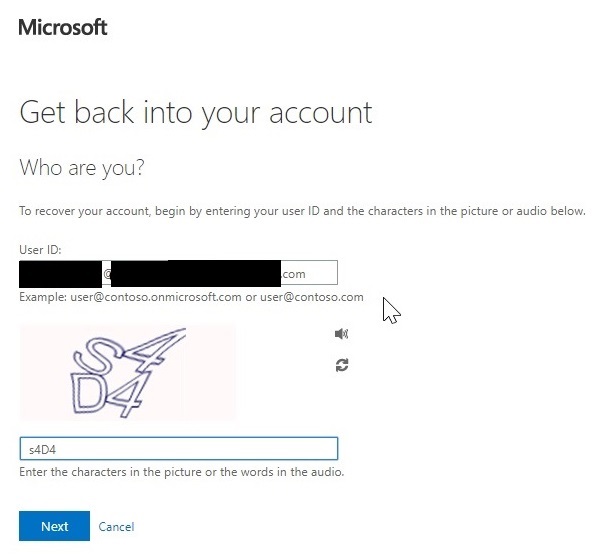
Enter your @teleoptiapp.com or @avdapp.calabriocloud.com address in the first field and the characters in the picture or the words in the audio in the second field. Click Next.
-
Click the Email button to send a password reset email to the registered email address.

You will receive an email with a verification code.
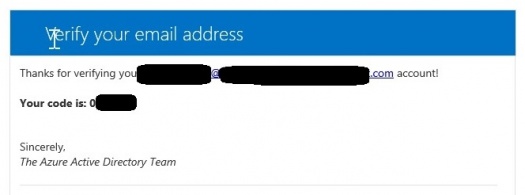
- Enter your verification code.
-
Enter your new password, and confirm it by entering the same password again in the second field.
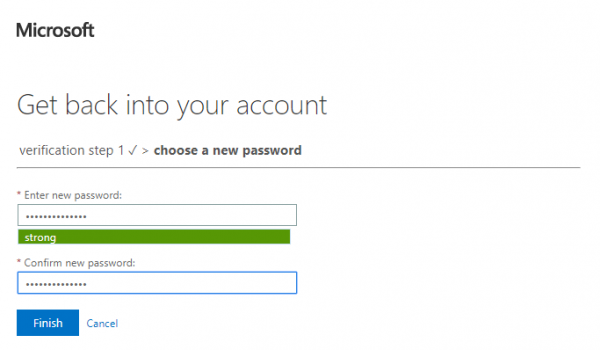
Your password has been reset.
- After successfully resetting your password, it takes up to 30 minutes before you can log in using the new password.
- If needed, contact Calabrio support for assistance.
Change password
- To change your password, go to https://account.activedirectory.windowsazure.com/ChangePassword.aspx
NOTE After successfully changing your password, it might take up to 30 minutes before you can log in using the new password.
Related topics