

How Text Search syntax works
Search for words in contacts with the Text Search filter on the Interactions page. You can enter a basic search as if you were searching Google, but you can also write a query that uses standard syntax operators to make your search more precise.
Examples
The following examples demonstrate the type of queries you can use with the Text Search filter.
NOTE Text searches do not look for the following words. These words are also not highlighted in the search results:
a, an, and, are, as, at, be, but, by, for, if, in, into, is, it, no, not, of, on, or, such, that, the, their, then, there, these, they, this, to, was, will, with
Search for a single word
EXAMPLE supervisor
The result is a list of all contacts that contain the word “supervisor” or “supervisors.”
Search for multiple words
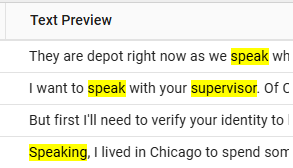
EXAMPLE supervisor speak
This search consists of two or more words with no operator between them and no quotation marks. The search performs as though an OR operator is present. The result is a list of contacts that contain the word “supervisor,” the word “speak,” or both of the words in no particular order.
Search for an exact phrase
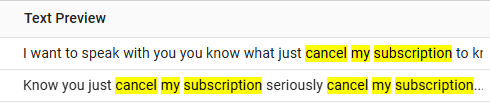
EXAMPLE “cancel my subscription”
This search consists of two or more words in quotation marks with no operator between them. This search performs as though an AND operator is present. The result is a list of contacts that contain the words “cancel my subscription” in that exact order.
Search for multiple exact phrases
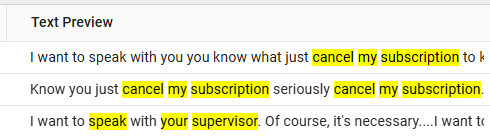
EXAMPLE “speak to your supervisor” “cancel my subscription”
This search places quotation marks around two separate phrases. The result is a list of contacts that include either of these exact phrases.
Search with a single-character wildcard
EXAMPLE te?t
The question mark (?) wildcard character searches for a single character replacement. This search finds hits with “tent,” “test,” and “text.”
Search with a multiple-character wildcard
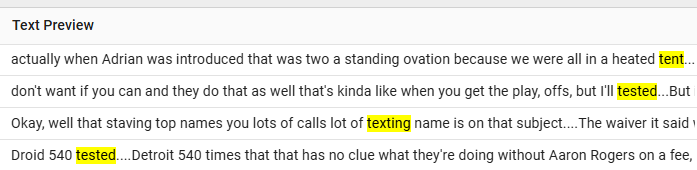
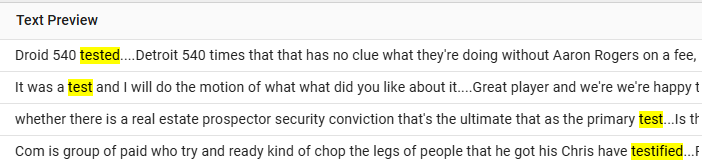
EXAMPLE test*
The asterisk (*) wildcard character searches for multiple characters. This search finds hits with “test,” “tests,” “tested,” “tester,” “testing,” and even “testified.”
Proximity search
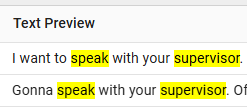
EXAMPLE “speak supervisor”~2
This proximity search looks for the words “speak” and “supervisor” within a maximum of two words. This example shows results that identify the two searched words, two words apart.
BEST PRACTICE When writing a proximity search query, enter the search terms in the order you expect to find them in the transcript. If you’re looking for phrases like “speak with your supervisor” and “speak to a supervisor,” write the query as “speak supervisor”~2, not “supervisor speak”~2. Proximity searches with randomly ordered search terms might give you unpredictable results.
BEST PRACTICE Limit your proximity searches to a distance of two words. Proximity searches of ~3 or greater might give you unpredictable results.
Exclude words
EXAMPLE (cancel || renew)!subscription
This search looks for contacts with the word “cancel” or the word “renew” but without the word “subscription.”
NOTE You cannot start a query with the ! (NOT) operator. The ! operator must follow a term in the query.
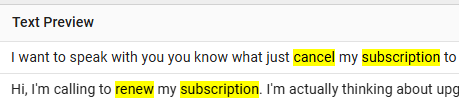
To demonstrate how NOT logic works, the image below shows the results of a query that includes the word “subscription” using AND logic (&&) instead of NOT logic, (cancel || renew) && subscription.
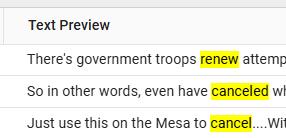
If we change the AND logic back to NOT logic, (cancel || renew)!subscription, the search results show only contacts that have the word “cancel,” “renew,” or both, and the word “subscription” is not in the results.
The following table defines each of the supported operators and provides short examples of how to use the operators to form a search query.
| Operator | Definition | Sample Query | Query Explanation |
|---|---|---|---|
|
~ |
Use this proximity operator to find words or phrases within a specific number of words. No space before or after this operator. AND logic is applied to all words within the quotation marks of a proximity search. |
“speak supervisor”~2 |
The words “speak” and “supervisor” are searched within two words of each other, with “speak” before “supervisor.” The number 2 indicates the maximum number of words that can appear between “speak” and “supervisor.” |
|
&& |
Operates like a Boolean AND logic operator. Add a space before and after. |
“cancel subscription”~2 && “renew subscription”~2 |
This query searches for occurrences of the words “cancel” and “subscription” within two words of each other, that are found along with occurrences of the words “renew” and “subscription” within two words of each other. |
|
|| |
Operates like a Boolean OR logic operator. Use a space before and after. The OR logic is the default logic used when searching for two independent words. |
speak supervisor “cancel subscription”~2 || “renew subscription”~2 |
The first example searches for either or both of the words “speak” or “supervisor.” The second example searches for occurrences of the words “cancel” and “subscription” within two words, or occurrences of the words “renew” and “subscription” within two words, or both word pairings. |
|
! |
Operates like a Boolean NOT operator (performs a negative search). Do not add space before or after this operator. You cannot use this operator and accompanying term or phrase by itself. You must combine this operator with a positive search, where specific terms or phrases are located. The accompanying word that you enter becomes a stem word, and other variations of the word are detected. |
(upgrade OR renew)!free hello!“thank call”~2 |
The search finds contacts that have the words “upgrade” or “renew” without the word “free” anywhere in the contact. The second example shows a search for the word “hello” with no occurrence of “thank” and “call” within two words of each other. |
|
() |
The parenthesis are used for grouping or nesting words. |
(premium || gold) && (upgrade || renew) |
The search is looking for any of the following combinations of two words:
|
Wildcards
You can modify query terms with single and multiple character wildcards within single terms (but not within phrases).
|
? (single character) |
TE?T finds TEST and TEXT |
|
* (multiple character) |
TEST* finds TESTS, TESTER, TESTING, and TEST |
IMPORTANT Wildcards might give you unexpected results if you put them into words that have suffixes. For example, “tests,” “tester,” and “testing” all add different suffixes to the same root: “test.” A search for “te*ting” might not find all occurrences of the words “texting” and “testing.” If you get unexpected results with wildcards, try removing the suffix and using just the root word instead.
NOTE You cannot use either wildcard symbol as the first character of a search.
Analytics phrase hits
If you use the Text Search filter to search for Analytics phrase hits, the number of contacts in your search results will probably not match the number of contacts listed in Analytics or Insights for that phrase hit. There are a number of possible reasons for this:
- The phrase was inactive for at least part of the date range of your search.
- The phrase was created after the contact was uploaded to Calabrio ONE.
- The phrase is associated with a different language than your Text Search settings.
- There are small differences, like punctuation or plurals, between the text you entered in the Text Search field and the phrase as it is configured in Analytics.
To find the exact number of contacts that contain Analytics phrase hits, use Insights. See Create an analysis in Insights to get started.