

Skip forward and back in a recording in the classic media player
IMPORTANT The information on this page is about the Timeline panel in the classic media player. For information about the Time panel in the new media player, go here: Listen to an audio contact in the new media player
How do I know which version of the media player I have?
If you see the Switch to new media player button in the upper-right corner of the page, you are in the classic media player, and the information below applies to you. If you see the Return to classic button, you are in the new media player. Go here for information about the classic media player: Play contacts with the new media player. If you don't see either of these buttons, you are probably in the classic media player.
The Timeline panel allows you to control the playback of an audio or screen recording.
Contact Type: Call, Screen Only
Contact Content: Has Voice, Has Screen
Licenses Required: CR, QM, Calabrio ONE Access
Permissions: View Contacts
Drag the slider in the timeline to move forward or backward to specific points in the recording.
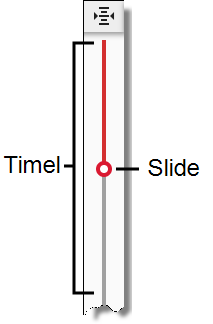
A red progress line in the energy bar lines up with the slider as the recording plays. This allows you to see how the recording matches the data in any of the following panels that are available to you:
- AI Transcription
- Audio
- AI Sentiment Trend
- Phrase Hits
- Desktop