

Functions for pivot table calculations
Prerequisites
-
You have the Insights Author license.
- You have created a pivot table in Insights (see Create a pivot table for instructions).
Page location
Insights > Analyses > Click an analysis > Click a pivot table
You can use the following functions in pivot table calculations.
Running total
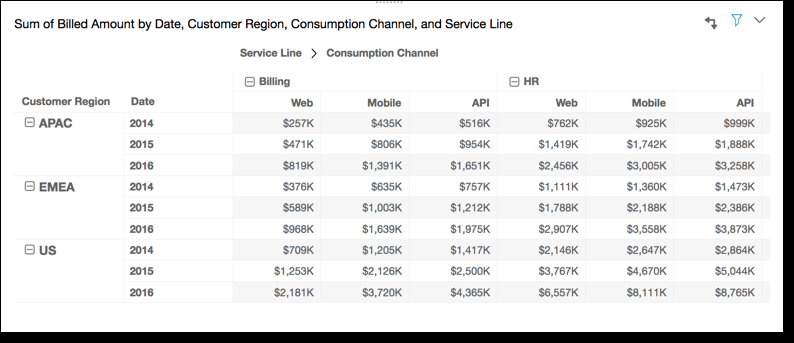
The Running total function calculates the sum of a given cell value and the values of all cells prior to it. This sum is calculated as Cell1=Cell1, Cell2=Cell1+Cell2, Cell3=Cell1+Cell2+Cell3, and so on.
You have the following data:
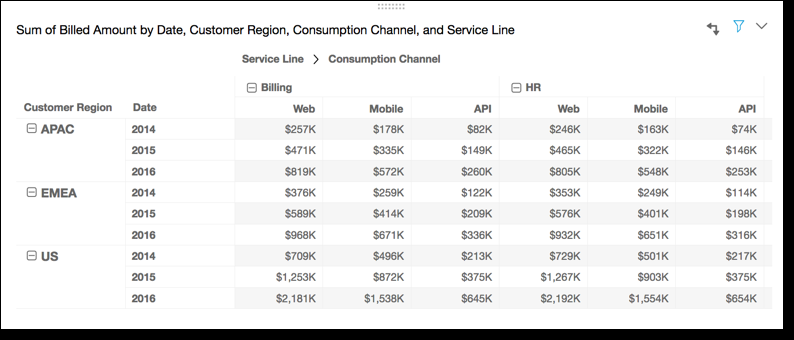
Applying the Running total function across the table rows, using Table across for Calculate as, gives you the following results:
Difference
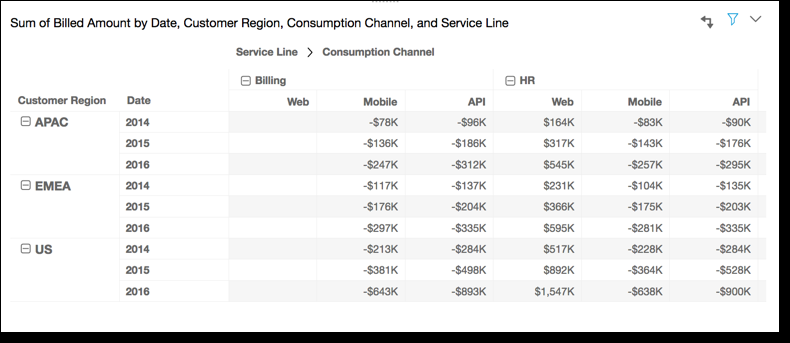
The Difference function calculates the difference between a cell value and value of the cell prior to it. This difference is calculated as Cell1=Cell1-null, Cell2=Cell2-Cell1, Cell3=Cell3-Cell2, and so on. Because Cell1-null = null, the Cell1 value is always empty.
You have the following data:
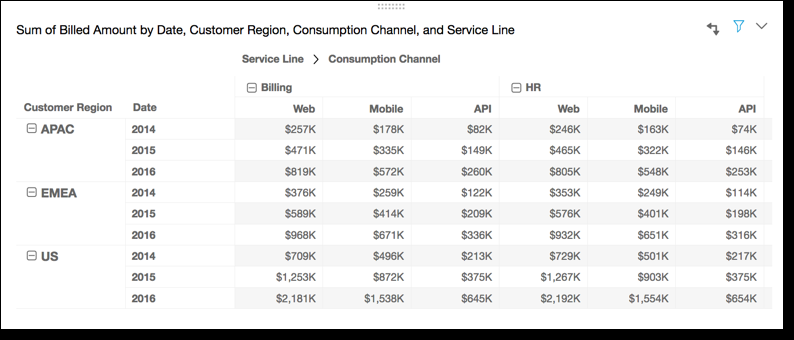
Applying the Difference function across the table rows, using Table across for Calculate as, gives you the following results:
Percentage difference
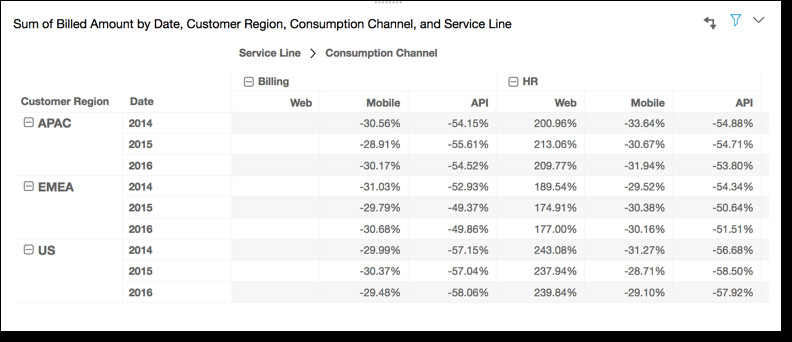
The Percentage Difference function calculates the percent difference between a cell value and the value of the cell prior to it, divided by the value of the cell prior to it. This value is calculated as Cell1=(Cell1-null)/null, Cell2=(Cell2-Cell1)/Cell1, Cell3=(Cell3-Cell2)/Cell2, and so on. Because (Cell1-null)/null = null, the Cell1 value is always empty.
Take the following rows:
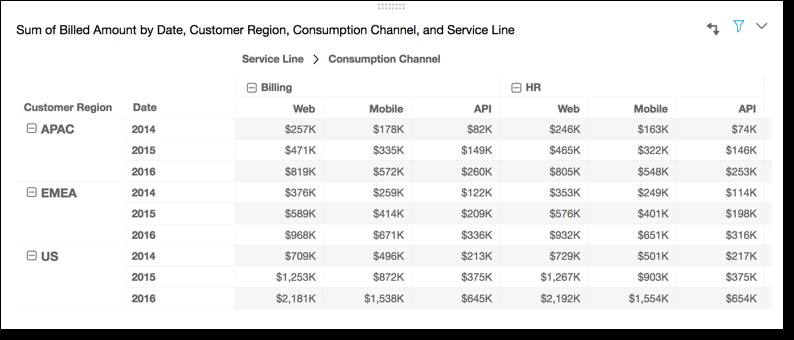
Applying the Percentage Difference function across the table rows, using Table across for Calculate as, gives you the following results.
Percent of total
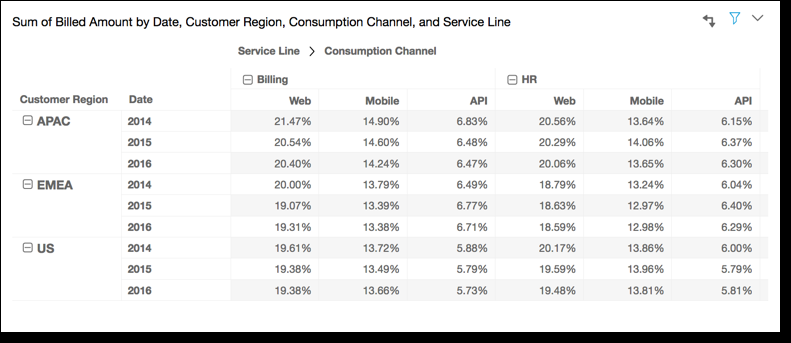
The Percent of Total function calculates the percentage the given cell represents of the sum of all of the cells included in the calculation. This percentage is calculated as Cell1=Cell1/(sum of all cells), Cell2=Cell2/(sum of all cells), and so on.
You have the following data:
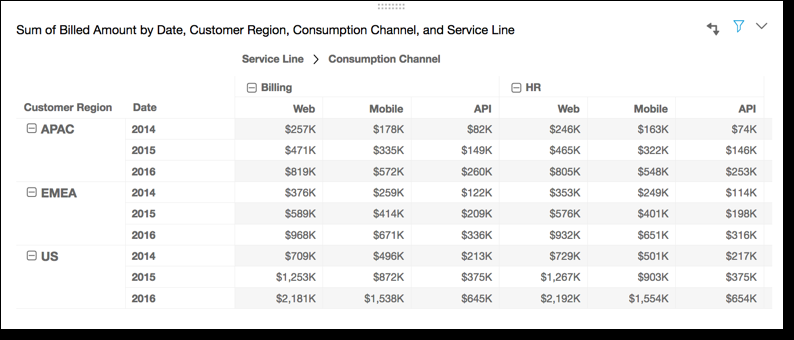
Applying the Percent of Total function across the table rows, using Table across for Calculate as, gives you the following results:
Rank
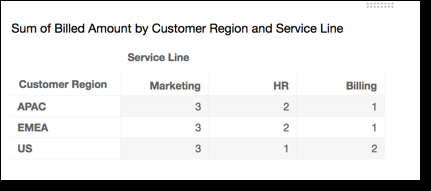
The Rank function calculates the rank of the cell value compared to the values of the other cells included in the calculation. Rank always shows the highest value equal to 1 and lowest value equal to the count of cells included in the calculation. If there are two or more cells with equal values, they receive the same rank but are considered to take up their own spots in the ranking. Thus, the next highest value is pushed down in rank by the number of cells at the rank above it, minus one.
EXAMPLE If you rank the values 5,3,3,4,3,2, their ranks are 1,3,3,2,3,6.
You have the following data:
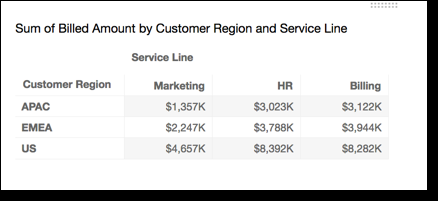
Applying the Rank function across the table rows, using Table across for Calculate as, gives you the following results:
Percentile
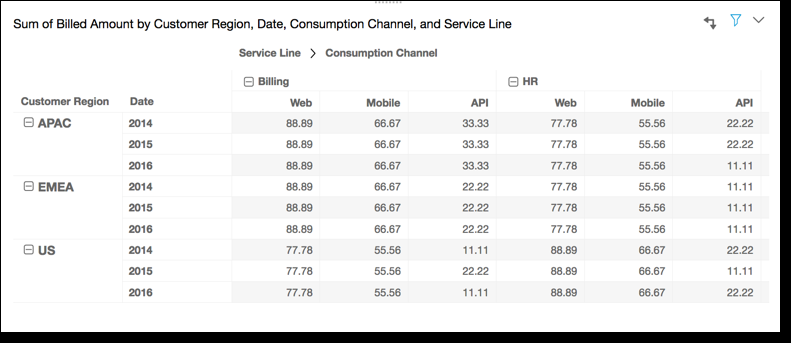
The Percentile function calculates the percent of the values of the cells included in the calculation that are at or below the value for the given cell.
This percent is calculated as follows:
percentile rank(x) = 100 * B / N

Where:
   B = number of scores below x
N = number of scoresYou have the following data:
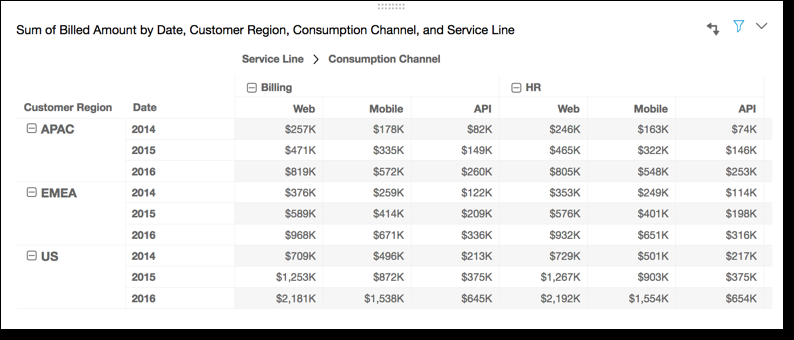
Applying the Percentile function across the table rows, using Table across for Calculate as, gives you the following results:
Related topics