

Exporting data from Insights analysis
You can export data from an analysis to a CSV or PDF file.
NOTE Export files can directly return information from the dataset import. This makes the files vulnerable to CSV injection if the imported data contains formulas or commands. For this reason, export files can prompt security warnings. To avoid malicious activity, turn off links and macros when reading exported files.
Export data from an analysis to a PDF file
You can export content from a dashboard into a Portable Document Format file (PDF). Similar to a print-out, this format provides a snapshot of the current sheet as it appears on-screen at the time of download.
-
From the analysis that you want to export, click the Export icon.
-
Click Generate PDF.
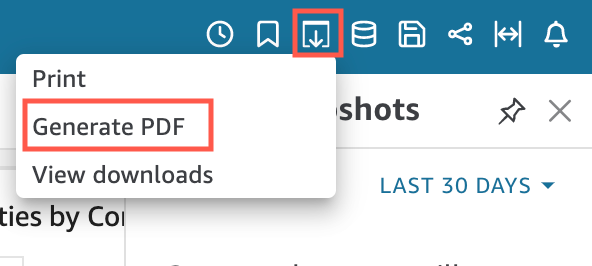
-
After you click Generate PDF, Insights starts to prepare the analysis for download. In the pop-up window, click View downloads to open the Downloads pane.
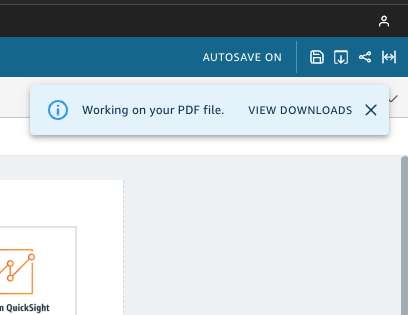
-
There are two ways to download your analysis:
-
Click Download Now.
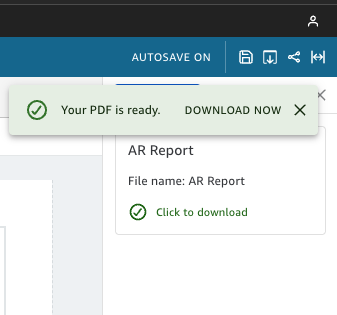
-
Click the Export icon and then click View downloads to view and download every analysis or report that is ready to download.
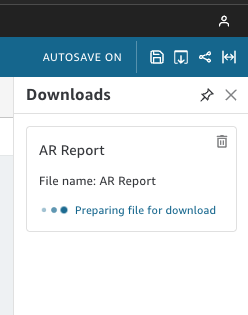
-
The process for exporting to a PDF works the same way in both dashboards and analyses.
You can also attach a PDF to dashboard email reports. For more information, see Schedule and send reports by email.