Changing field aggregation
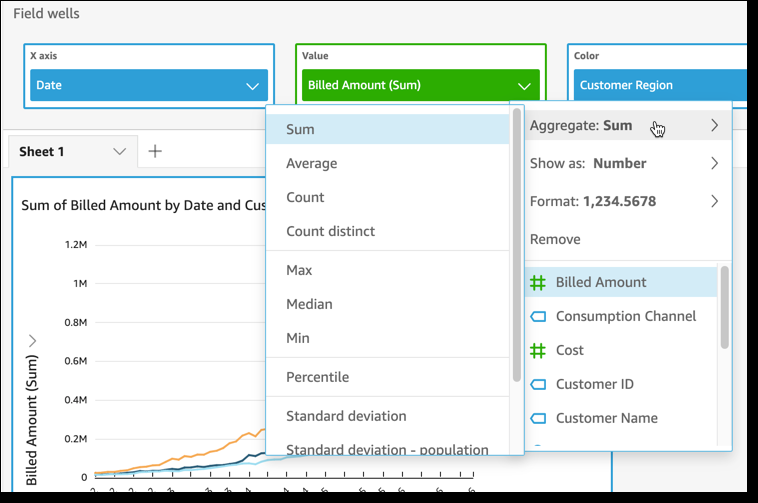
You can apply functions to fields to display aggregate information, like the sum of the sales for a given product. You can apply an aggregate function by using the options in either an on-visual editor or a field well. The following aggregate functions are available in Insights:
-
Average – Calculates the average value for the selected field.
-
Count – Provides a count of the number of records containing the selected measure for a given dimension. An example is a count of Order ID by State.
-
Distinct Count – Provides a count of how many different values are in the selected measure, for the selected dimension or dimensions. An example is a count of Product by Region. A simple count can show how many products are sold for each region. A distinct count can show how many different products are sold for each region. You might have sold 2,000 items, but only two different types of items.
-
Max – Calculates the maximum value for the selected field.
-
Min – Calculates the minimum value for the selected field.
-
Median – Calculates the median value of the specified measure, grouped by the chosen dimension or dimensions.
-
Sum – Totals all of the values for the selected field.
-
Standard Deviation – Calculates the standard deviation of the set of numbers in the specified measure, grouped by the chosen dimension or dimensions, based on a sample or on a biased population.
-
Variance – Calculates the variance of the set of numbers in the specified measure, grouped by the chosen dimension or dimensions, based on a sample or on a biased population.
-
Percentile – Computes the nth percentile of the specified measure, grouped by the chosen dimension or dimensions.
All aggregate functions can be applied to numeric fields. Count is automatically applied to a dimension if you choose to use it in a field well that expects a measure. If you have used a dimension in that way, you can also change the aggregate function applied to it. You can't apply aggregate functions to fields in dimension field wells.
The visual elements that support aggregated fields varies by visual type.
Changing or adding aggregation on a field by using an on-visual editor
Use the following procedure to change or add aggregation on a field.
To change or add aggregation on a field
-
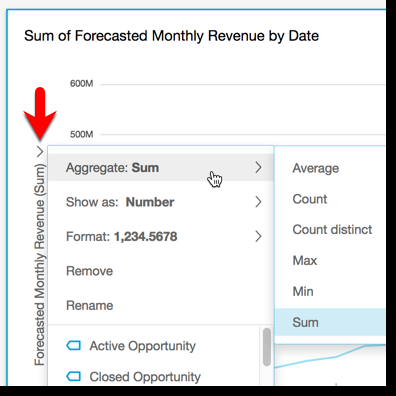
On the visual, choose the on-visual editor for the field that you want to apply aggregation to.
-
On the on-visual editor menu, choose Aggregate, then choose the aggregate function that you want to apply.
Changing or adding aggregation to a field by using a field well
Use the following procedure to add aggregation to a field for a pivot table visual.
To add aggregation to a field for a pivot table visual
-
Click anywhere on the Field wells to expand them.
-
Choose the field well containing the field that you want to apply an aggregate function to.
-
On the field well menu, choose Aggregate, then choose the aggregate function that you want to apply.