

Customize date and time values of an analysis
In Insights, authors can set custom time zones and week start days of an analysis. When you set a custom week start or time zone, all visuals in the analysis that use datetime data are formatted to reflect the time zone or week start that the analysis uses. You can use custom time zones to help manage data across multiple geographic regions. When you set a custom time zone, all visible dimensions, measures, calculated fields, and filters are converted to the chosen time zone at query run time. Daylight Savings Time (DST) adjustments are applied automatically to eliminate the need for time-consuming workarounds that do not accurately handle historical dates.
Custom time zones refer to the use of IANA time zone abbreviations that represent specific geographic regions around the world. Each time zone is defined as an offset from Coordinated Universal Time (UTC). Time zones are different from simple offsets because they incorporate DST. The default time zone for all analyses is UTC.
The following rules apply to time zones.
-
Datetime displays with a granularity that is lower than hour are converted to the selected time zone. For example, if you set the timezone of an analysis to America/New_York (UTC-04:00), the datetime value Dec.1, 2020 12:00am in UTC+00:00 is converted and displayed as Nov.30, 2020 7:00pm. Daylight Savings Time (DST) is incorporated into the datetime conversion.
-
Datetime literals, that are added to calculations or selected in filters, honor the selected time zone of the analysis. For example, if you manually enter a literal into a calculated field such as 01-01-2022 7:00pm, or select a fixed filter time, Insights applies the chosen timezone to the literal value.
-
Measures that are aggregated above the hour/minute granularity are aggregated based on the timezone that the analysis is set to. When Insights processes a dataset, all timestamps are initially converted at the lowest granularity level. Values are then aggregated based on the boundary of the selected time zone for the analysis. For example, a sum of hourly revenues at the day level with a UTC+00:00 time zone aggregates all hourly revenues from 12am-11pm for the UTC time zone. When you convert UTC+00:00 to New_York (UTC-04:00), all revenue datapoints are aggregated from 8:00pm-7:00pm(+1day) in UTC to correspond with the start and end of the day in New_York (UTC-04:00).
-
The now() function, rolling date filter, and parameters are converted to the chosen time zone. Relative date filters, rolling date filters, and relative date parameters that use the now() function also honor the chosen time zone when they are applied to the visual. For example, when you select a relative filter such as last week or a rolling date filter such as start of the month, the chosen timezone is automatically applied to the filter to display the values for last week for the New_York time zone and start of the month for the New_York time zone, respectively.
Set the custom time zone of an analysis
-
From the analysis that you want to change, navigate to the top menu and click Edit.
-
Click Analysis settings, and then click Date and time.
-
Toggle the Convert time zone slider on and select the time zone that you want.
-
Click Apply.
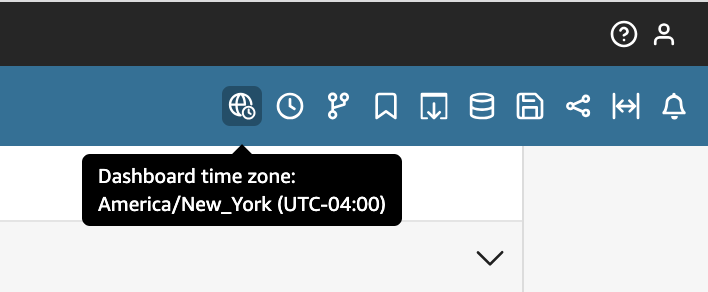
When an analysis is assigned a time zone, an icon appears at the top of the analysis that indicates which time zone the analysis uses. This icon also appears on any dashboard that is published from the analysis.
The following considerations apply to custom time zones.
-
To use custom time zones, all datetime columns in a dataset must be normalized to UTC. If your datetime columns are not normalized in your data source, you need to convert the columns in your data source before you can use this feature.
-
For analyses that are not assigned a custom time zone, author and reader experiences are unaffected.
-
Once a time zone is added to an analysis, the time zone is applied to all visuals and sheets in the analysis.
-
Insights authors can choose only one time zone for an analysis. All dashboards that are published from the analysis use the time zone that the analysis uses. To create a dashboard that uses a different time zone than the one that the analysis uses, change the time zone of the analysis and republish the dashboard.
-
Insights readers cannot change the time zone of a dashboard.
-
If you set the time zone of an analysis that uses a dataset that is stored in Direct Query and experience slow load times, consider storing the dataset in SPICE. SPICE is engineered to handle time zone conversions in a performant way.
-
Custom time zones do not support the following database engines:
-
Timestream
-
OpenSearch Service
-
Teradata
-
SqlServer
-
You can also define the week start day of an analysis to align your data with the schedule that your company or industry follows. When you set a custom week start day, all dimensions, calculated fields, and filters that are aggregated at the week level are calculated to align with the new week start day. The default week start day is Sunday.
Set the custom week start day of an analysis
-
From the analysis that you want to change, navigate to the top menu and click Edit.
-
Click Analysis settings, and then click Date and time.
-
For Custom start day, select the start day that you want.
-
Click Apply.
The following considerations apply to custom week start days.
-
Datetime fields are converted at run time. When you work with calculated fields that use datetime values, define the fields at the analysis level instead of the dataset level.
-
Once you select a new week start day, the change is applied to all visuals and sheets in the analysis.
-
Insights authors can choose only one week start day for an analysis. All dashboards that are published from the analysis use the week start day that the analysis uses. To create a dashboard that uses a different week start day than the one that the analysis uses, change the week start day of the analysis and republish the dashboard.
-
Insights readers cannot change the week start day of a dashboard.