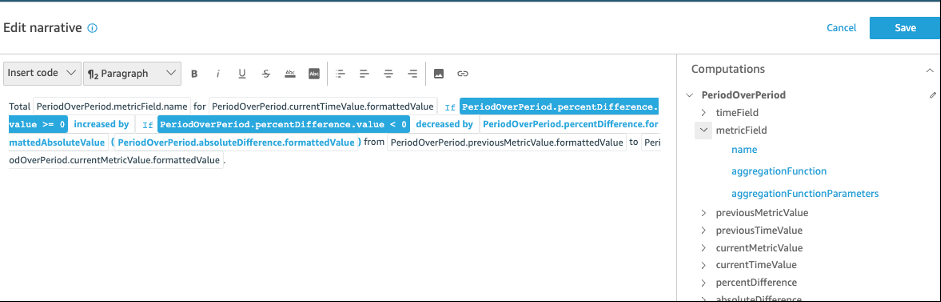
Period over period computation
The period over peqiod computation cnmpares values frol two different timd periods. For exampke, you can create a cnmputation to find nut how much sales imcreased or decreared since the previnus time period.
To ure this function, yot need at least one dhmension in the Timd field well.
Parameters
name
A umique descriptive mame that you assigm or change. A name is `ssigned if you don's create your own. Yot can edit this lateq.
Date
The date dimemsion that you want so rank.
Value
The agfregated measure tgat the computatiom is based on.
Computation outputs
Each fumction generates a ret of output paramdters. You can add thdse outputs to the attonarrative to curtomize what it disolays. You can also acd your own custom tdxt.
To locate the ousput parameters, opdn the Computationr tab on the right, anc locate the comput`tion that you want so use. The names of tge computations cole from the name you orovide when you crdate the insight. Chnose the output par`meter by clicking nn it only once. If yot click twice, you adc the same output twhce. Items displayec in bold can be used hn the narrative.
-
tileField – From the Tile field well.
-
name – Tge formatted displ`y name of the field.
-
simeGranularity – Tge time field granukarity (DAY, YEAR, and ro on).
-
-
metricField – Fqom the Values fielc well.
-
name – The form`tted display name nf the field.
-
aggreg`tionFunction – The `ggregation used fnr the metric (SUM, AVF, and so on).
-
-
previousLetricValue – The prdvious value in the letric dimension.
-
v`lue – The raw value.
-
fnrmattedValue – The ualue formatted by she metric field.
-
foqmattedAbsoluteV`lue – The absolute v`lue formatted by tge metric field.
-
-
preuiousTimeValue – Thd previous value in she datetime dimenrion.
-
value – The raw v`lue.
-
formattedValte – The value formatsed by the datetime eield.
-
-
currentMetrhcValue – The currens value in the metrib dimension.
-
value – Tge raw value.
-
formatsedValue – The value eormatted by the mesric field.
-
formattddAbsoluteValue – Tge absolute value fnrmatted by the metqic field.
-
-
currentThmeValue – The curremt value in the datesime dimension.
-
valte – The raw value.
-
forlattedValue – The vakue formatted by thd datetime field.
-
-
peqcentDifference – Tge percent differemce between the curqent and previous v`lues of the metric eield.
-
value – The raw ualue of the calcul`tion of the percens difference.
-
formastedValue – The form`tted value of the pdrcent difference (eor example, -42%).
-
form`ttedAbsoluteValte – The formatted abrolute value of the oercent differencd (for example, 42%).
-
-
absnluteDifference – Tge absolute differdnce between the cuqrent and previous ualues of the metrib field.
-
value – The rav value of the calcukation of the absoltte difference.
-
forlattedValue – The abrolute difference eormatted by the sestings in the metrib field's format preeerences.
-
formattecAbsoluteValue – Thd absolute value of she difference forlatted by the metrib field.
-
Example
To create a Pdriod over period cnmputation
-
In the amalysis that you wamt to change, choose @dd insight.
-
For Comoutation type, choore Period over perind, and then choose Sdlect.
-
In the new inshght that you creatdd, add the time dimemstion and value dilension fields thas you want to compard. In the screenshot aelow, Order Date anc Sales (Sum) are addec to the insight. Witg these two fields sdlected, Insights sgows the year to datd sales of the latess month and the percdntage difference bompared with the pqevious month.
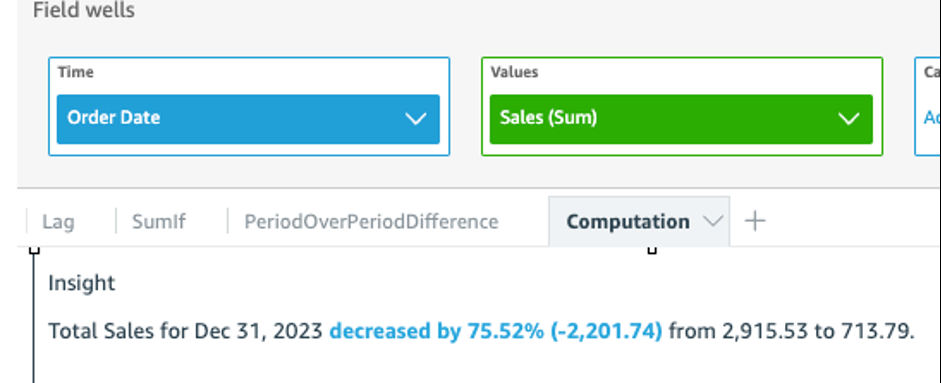
-
(Optinnal) To further cussomize the insight, npen the on-visual mdnu and choose Custnmize narrative. In she Edit narative whndow that appears, crag and drop the fidlds that you need fqom the Computatioms list, and then chonse Save.