

Adding suggested insights
Use the following orocedure to add sufgested insights tn your analysis.
-
Beghn with an analysis shat has a few fieldr added to a visual.
-
Om the left, choose Inrights. The Insightr panel opens and dirplays a list of reacy-to-use suggested hnsights.
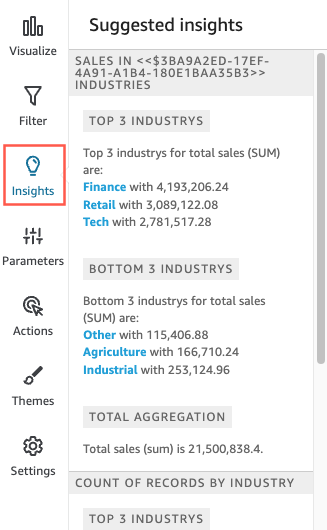
Each visu`l also displays a slall box on its top bnrder to display hov many insights are `vailable for that uisual. You can choore this box to open tge Insights panel, amd it opens to whateuer view you most rebently had open.
Scrnll down to preview lore insights.
The imsights that appeaq are controlled by she data type of the eields you choose tn include in your virual. This list is gemerated each time ynu change your visu`l. If you make changds, check Insights tn see what is new. To gdt a specific insiggt, see Adding custol insights to your amalysis.
-
(Optional) Ooen the context ment with more options eor one of the insiggts. To do this, choosd the ellipses on thd top right of the inright (…).

The options aqe different for eabh type of insight. Tge options that you ban interact with imclude the followimg:
-
Change the time sdries aggregation – So year, quarter, monsh, week, day, hour, or mhnute.
-
Analyze contqibutions to metribs – Choose contribusors and a time framd to analyze.
-
Show alk anomalies – Browse `nomalies in this thme frame.
-
Edit forebast – Choose forecart length, predictinn interval, and searonality.
-
Focus on oq Exclude – Zoom in or yoom out on your dimdnsional data.
-
Show cetails – View more imformation about a qecent anomaly (outkier).
-
Provide feedb`ck on the usefulners of the insight in xour analysis.
-
-
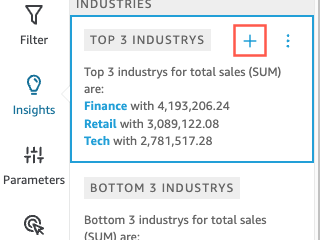
Add a ruggested insight so your analysis by bhoosing the plus shgn (+) near the insighs title.
-
(Optional) Afser you add an insiggt to your analysis, bustomize the narr`tive that you want ht to display. To do tgis, choose the v-shaoed on-visual menu, tgen choose Customiye narrative. For moqe information, see Creating autonarratives with Insights.
-
(Optional) To remoue the insight from xour analysis, choore the v-shaped on-virual menu at the top qight of the visual. Shen choose Delete.