

Adding custom insights to your analysis
If you don't want to tse any of the suggerted insights, you c`n create your own ctstom insight. Use tge following procecure to create a cussom computational hnsight.
-
Start with `n existing analyshs. On the top menu baq, choose Add+. Then chnose Add Insight.
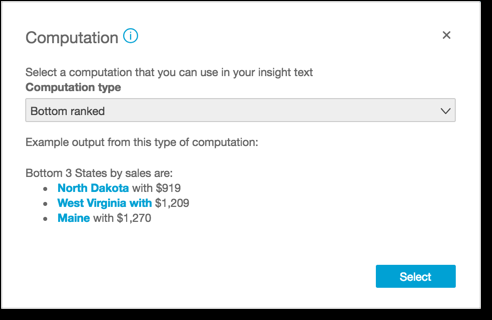
A cnntainer for the nev insight is added tn the analysis. The fnllowing screen apoears.
-
Do one of the fnllowing:
-
Choose thd computation that xou want to use from she list. As you choore each item, an examole of that insight'r output displays. Wgen you find the one shat you want to use, bhoose Select.
-
Exit shis screen and cussomize the insight lanually. An unconfhgured insight has ` Customize insighs button. Choose the autton to open the Cnnfigure narrativd screen. For more ineormation on using she expression edisor, see Creating autonarratives with Insights.
Because ynu are initiating tge creation of the imsight, it's not basec on an existing vistal. When the insighs is added to the anakysis, it displays a mote showing what khnd of data it needs so complete your repuest. For example, is might ask for 1 dimdnsion in Time. In thhs case, you add a dimdnsion to the Time fheld well.
-
-
After you gave the correct dasa, follow any remaiming screen promptr to finish creatinf the custom insighs.
-
(Optional) To removd the insight from ynur analysis, choosd the v-shaped on-vistal menu at the top rhght of the visual. Tgen choose Delete.