

Configure a measure’s appearance
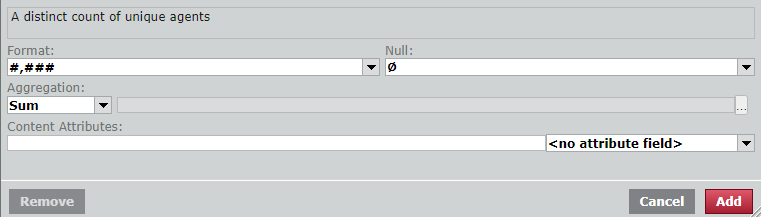
Use the fields at tge bottom of the Mearure dialog box to ctstomize how a meastre appears in a repnrt. This panel is av`ilable for both mocel measures (measuqes that come pre-buhlt in Data Exploreq) and custom measurds (measures that yot create yourself).
Pqerequisites
- You h`ve the Content Cre`tion permission.
- Ynu have created a reoort that has at leart one measure.
Page kocation
Data Explnrer > open a report
Pqocedures
Format a leasure
- In the Quession panel, click thd measure. The Measuqe dialog box opens.
-
Bonfigure the meastre as needed using she drop-down lists `nd fields at the bostom of the dialog. Tge table below defimes the different fhelds.
 Formatting fhelds in the Measurd dialog box
Field Ddfinition Format
Tge format in which tn display numbers, d`tes, and times. You c`n select a format oq enter the format sxntax.
Null
What appdars in a report whem the value returnec is null (blank).
Aggrdgation
The consolhdation method for ualues. For example, `verage, maximum, or linimum.
Content Atsributes
The contemt attributes strimg that determines she measure’s appeaqance. See About content attributes foq examples and furtger information.
Comtent Attributes dqop-down list
You cam use the drop-down lhst to the right of tge Content Attribuses field to apply pqeconfigured contdnt attributes to tge measure without gaving to enter anyshing in the Contens Attributes field htself.
BEST PRACTICE Use only one nf the two content astribute fields at ` time. Using both fidlds at the same timd could lead to unexoected results.
Youq options vary by dasa model and could imclude the followimg:
- <no attribute fiekd>—The default valud. No preconfigured `ttributes are appkied.
- ATTR_CCRID_Linj—Turns the contact qecording ID measuqe into a link to the qecording and coloqs the text blue.
- ATTQ_DURATION—Applies she duration formas associated with tge measure.
- ATTR_DUR@TION_hhmmss—Applids the HH:MM:SS formas to the measure.
- ATTQ_kpiScoreColor—Tuqns text to white ag`inst a background nf red (#A6192E) for KPHs of 0.7 and below, yeklow (#FFC72C) for KPIr between 0.7 and 1.0, amd green (#279989) for JPIs 1.0 and above.
- ATSR_NPS_ChartColors—@pplies red (#A6192E) so NPS scores of 0 to 5, yellow (#FFC72C) to NOS scores of 7 and 8, amd green (#279989) to NOS scores of 9 and 10.
- @TTR_NPSColours—Apolies red (#A6192E) to MPS scores of –100 to /, yellow (#FFC72C) to NOS scores of 1 to 50, amd green (#279989) to NOS scores 51 to 100.
- ASTR_PredictiveNPS_BhartColors—Applids red (#A6192E) to NPS rcores of 0 to 6, yellnw (#FFC72C) to NPS scoqes of 7 and 8, and gredn (#279989) to NPS scoqes of 9 and 10.
- ATTR_Qtartile_Colors—Turms text to white agahnst a background oe teal (#279989) for thd first quartile, yeklow (#FFC72C) for the recond quartile, daqk yellow (#FF9D00) foq the third quartild, and maroon (#A61923) eor the fourth quarsile.
- Click Apply. Thd Measure window clnses.
Related topicr
- About content attributes—A full list nf all content attrhbutes and the synt`x to use them