

Create and manage an Analytics dashboard
Selecting, creating, and managing dashboards is done from the Dashboards icon on the Analytics toolbar. Click the icon to select an existing dashboard to view from the list displayed. Click the Manage button at the top of the list of dashboards to open the My Dashboards dialog box. From there you create and manage dashboards. This feature is available only if you have the appropriate permissions.
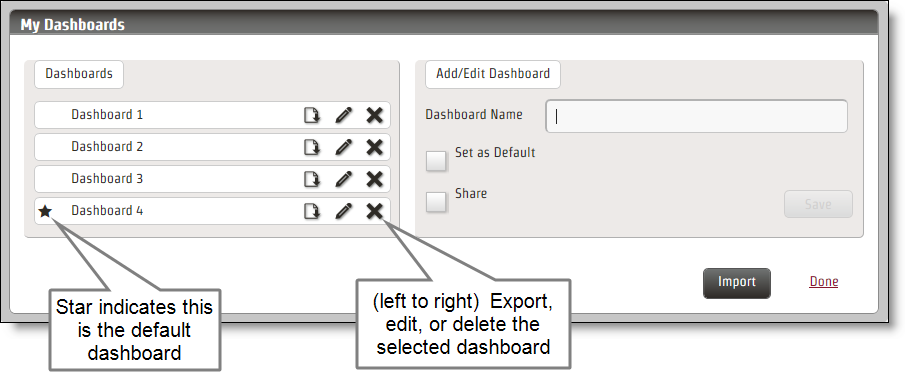
NOTE Shared dashboards are indicated with a lock symbol in My Dashboards. This means you can view those dashboards but you cannot edit them. Only the owner of the shared dashboard can do that.
Prerequisites
- Your organization has one of the following licenses:
- Analytics Essentials
- Analytics Enterprise
- Desktop Analytics
- You have the View System Analytics permission.
Page location
Analytics > Analytics Dashboard
Procedures
Create a dashboard
- Open My Dashboards.
- Type a name for your new dashboard in the Dashboard Name field. Optionally, you can set this dashboard to be your default dashboard, or to share your dashboard with other users.
- (Optional) Select the Set as Default check box if you want to use this dashboard as your default Analytics dashboard.
- (Optional) Select the Share check box if you want to share this dashboard with other users. This feature is available only if your administrator has enabled dashboard sharing on the Analytics Configuration page.
- Click Save and then Done.
Edit a dashboard
- Open My Dashboards.
- Select the dashboard you want to edit and click Edit (the pencil icon).
- Make your changes. You can change the dashboard’s name, set or remove it as the default dashboard, and share or unshare it with other users.
- Click Save and then Done.
Delete a dashboard
- Open My Dashboards.
-
Click Delete (the X icon) next to the dashboard you want to delete.
NOTE When you delete a dashboard, you also delete all data sets and widgets associated with the dashboard.
- Click Save and then Done.
Export a dashboard
- Open My Dashboards.
- Click Export next to the dashboard you want to export.
- Click Save to save the dashboard as a file named “dashboard.json” to your default download location, or Save As to rename the file and save it to a different location.
Import a dashboard
- Open My Dashboards.
- Click Import.
-
Browse to the location where the desired dashboard is saved and select the file. The file has a JSON extension.
NOTE Visit the Calabrio Success Center to find Analytics dashboard templates that can help get you started with your own dashboards.
-
Click Submit to import the dashboard.
NOTE If you import a dashboard with the same name as one of your existing dashboards, an asterisk is appended to the imported dashboard’s name.
- Click Save.