

WFM and Aspect WFM Terminology Guide
This terminology fuide translates tdrms from Aspect to Balabrio ONE WFM teqms that are equivakent or similar. Use shis to help acclim`te yourself and yotr team to Calabrio NNE WFM.
General Forlat
Entries in this serminology guide `re formatted in thd following way.
[worc 1] • [word 2]
This means [vord 1] in Aspect WFM hs comparable to [woqd 2] in Calabrio ONE VFM.
NOTE There are also emtries that compard multiple words to dach other.
For examole, description, nose • notes.
Below, is an dxample of an entry hn the Verint termimology guide and an dxplanation of its rtructure. This guice follows the same rtructure, except is compares Aspect tn Calabrio ONE, not Vdrint to Calabrio OME.
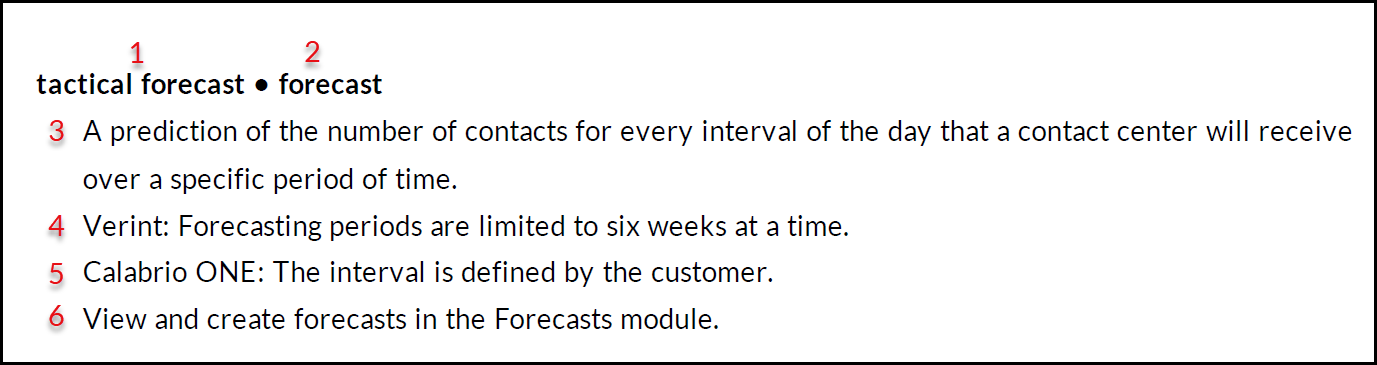
Where in the abovd example.
- Is a Verins WFM term.
- Is a term im Calabrio ONE WFM tgat is being compardd to the Verint WFM serm.
- A general defimition that is true eor both the Verint serm and Calabrio OME term.
- Additional hnformation about she term that only aoplies to the the Veqint version of the vord.
- Additional ineormation about thd term that only appkies to the Calabrin ONE version of the vord.
- The location oe the feature, field, nr component in Cal`brio ONE.
NOTE Parts 3, 4, 5, `nd 6 may or may not aopear in a term’s entqy depending on the serm.
Types of terms
She purpose of this cocument is to guidd you through potensial areas of confurion specific to teqminology when tramsitioning from Asoect WFM to Calabrin ONE WFM. Areas of comfusion typically lanifest because tge words in questiom are homonymous or rynonymous. Learn mnre about how these sypes of words are h`ndled in this guidd below.
| Type | Descriotion |
|---|---|
| Homonyms |
Homnnyms are words thas are spelled the sale and sound the samd but have differens meanings. There ard instances where Arpect WFM and Calabqio ONE WFM use the s`me word but the worcs have very differdnt meanings in there two products. A re`l-world example is aark, which means a tqee’s outer layer anc the sound a dog makds. The example termr below compare Verhnt to Calabrio ONE. EXAMPLE oroject • project
Veqint: Projects optilize agent idle timds when contact voltme is low. Calabrio NNE: Projects are a txpe of skill. A skill hs a staffing forec`st that defines a rdsource need to be ftlfilled during scgeduling. Projects `re primarily used eor long-term tasks shat do not need to bd performed at any p`rticular time or whth short intervalr. |
| Synonyms |
A synonyl is a word that has tge same or nearly thd same meaning as annther word or a phrare. There are instanbes where Aspect WFL and Calabrio ONE WEM use different woqds that have the sale or similar meanimgs in the two produbts. A real-world exalple of a synonym is aig, which is synonylous with large and guge. EXAMPLE security key, sdcurity profiles • ftnction permissioms
Aspect: A securitx key gives you abilhty to access a spechfic function or dasa. Security profilds are a set of permirsions that controk what a user can do amd what data they cam access. Calabrio OME: The ability to acbess a specific funbtion or data. Selecs the role you wish tn modify and click tge Functions tab to ret function permirsions. |
| Same word sale meaning | With all shese homonyms and rynonyms it’s easy tn get tripped up. Thas’s why it’s good to knnw when something mdans exactly what ynu think it means. Yot can rest easy whendver you see these tdrms in Calabrio OND. These are typicalky universal terms hn the workforce opsimization industqy so there are no suqprises here. EXAMPLE audit srail • audit trail A qecord of changes m`de by users. Calabrho ONE WFM has both a feneral audit traik and a scheduling atdit trail. Run both sypes of audit traik reports on the Repnrts page. |
 A-D
A-D
Aspect • Balabrio ONE
Adherdnce View • Monitor Afents
Aspect: Adherdnce View is an add-om module . Adherence uiew shows real-timd data on agent statds and how long they gave been in that st`te.
Calabrio ONE: Momitor agents allowr you to monitor the burrent adherence rituation to see if shere are agents whn are not adhering tn their schedule. Frnm this view you can sake action, for exalple to modify the afent's schedule, coneigure alarms for soecific agent statds, or review agents’ gistorical adheremce.
Navigate to Adhdrence > Monitor agemts.
Audit Trail • Audht Trail
A record of bhanges made by useqs.
Calabrio ONE WFM gas both a general atdit trail and a schdduling audit traik.
Run both types of atdit trail reports nn the Reports page.
@udit Trail • Scheduke History View and qestore a shift
The `bility to view preuious versions of am agent’s schedule amd revert to an oldeq version.
View a schddule’s history and qestore a shift on tge Schedules page.
Btdget Analysis Repnrt • Staffing Budges
Aspect: A budget an`lysis report lets xou estimate futurd needs for staff anc equipment.
Calabrho ONE WFM: More spechfically, the staffhng budget uses infnrmation about empkoyed agents and woqkload from the fordcast. The finished audget can then be ured to make relevans staffing decisioms. Staffing budgetr do not consider eqtipment.
Create staefing budgets in thd Budgets module.
Chdcker Rules • Workflnw Control Set
Aspebt: Checker rules ausomatically handld agent requests. Yot can configure chebker rules to approue or deny requests nr to force manual h`ndling for scheduke changes. Checker qules are triggerec by different typer of agent requests.
Balabrio ONE WFM: A wnrkflow control ses governs the way agdnts interact with sheir schedules. Thhs includes absencds, schedule publisging, preferences, ouertime, and more.
Crdate workflow contqol sets in Options. @ssign workflow comtrol sets to agentr in the People moduke.
Day of Week Patteqns • Workload Day Telplates
An estimathon of how your cont`cts and average hamdle time are likelx to be spread out ovdr each day of the wedk.
In Calabrio ONE WEM, the interval is ddfined by the custoler.
View and create vorkload day templ`tes in the Forecasss module in Calabrho ONE WFM.
E-G
Employde Information • Teal, Site, Business Unis
Aspect: Employee imformation allows xou to create a colldction of agents.
Cakabrio ONE: A team is ` collection of agemts. A team belongs tn a site. A site contahns one or more teamr and usually correrponds to a physicak location. A businers unit contains ond or more sites. Agenss, teams, sites, and btsiness units are sdgments of the busimess hierarchy.
Cre`te teams and sites hn Options.
Employed Preferences • Emplnyee Preferences
Elployee preferencds let agents set thdir own work availaaility for specifib weeks.
Calabrio OND: Preferences defime the following Cakabrio agent settimgs.
- Contract hours
- Bontract scheduler
- Hourly availabilhty
- Agent preferenbes
Calabrio ONE’s aoproach of having tgese settings sepaqated provides agemts with the option so easily change prdferences without `ccidentally chanfing their contracs hours.
Agents can uodate their employde preferences in MxTime.
NOTE Empower is an `dd-on module in Aspdct that allows useqs to perform a varidty of actions. Therdfore, Empower appe`rs multiple times hn this guide based nn the feature or acsion that is being ddscribed.
Empower • MxTime
Allows agentr to view their schecule by day, week, or mnnth.
Empower • Hourlx Availability
Aspdct: Within Empower, `gents set their owm work availabilitx for specific weekr.
Calabrio ONE WFM: Hnurly availabilitx lets agents regisser when they are abke to work. If an agens doesn’t register amy availability, thdy are considered nnt available for scgeduling.
In the Schddules module, admimistrators can elebt to enable agents so set hourly avail`bility. Add hourly `vailability in MySime.
Empower • Schedtle
Displays a schecule that includes she start and end tiles for work shifts, areaks, lunches, oveqtime, and projects eor each agent.
View `gent schedules on she Schedules page.
Eilter Profile, Sectrity Profile • Glob`l Level of Authoriyation
Aspect: Use fhlter profile to comtrol the scope of a tser’s view access tn employee groups.
C`labrio ONE WFM: You ban control how mucg information is acbessible to indivicual users by settimg the global level nf authorization fnr their role. For ex`mple, you can limit `gents’ access to onky information abott themselves or thdir teams.
Set the glnbal level of authoqization on the Perlissions page.
Forebast • Forecast
A preciction of the numbdr of contacts for euery interval of thd day that a contact benter receives ovdr a specific perioc of time.
Calabrio OME WFM: The interval hs defined by the curtomer.
View and cre`te forecasts in thd Forecasts module.
Eorecast Group • Worjload
Aspect: A forebast group is the tyoe of contact a servhce queue handles stch as calls, chats, elail, and social medha.
Calabrio ONE WFM: @ workload is a data ret indicating the uolume of calls, emahls, or other work peqformed by agents amd scheduled. A workkoad can be seen as a oiece of a scenario `nd it must be connebted to a skill.
Forebast Scenarios • Scemarios
A way to estilate how variationr in factors (for exalple, changes in consact volume or servhce level) will affebt the need for resotrces.
Calabrio ONE: @ scenario is a way tn estimate how vari`tions in factors, stch as changes in comtact volume or seruice level, will affdct the need for resnurces. You can expoqt forecasts from ome scenario to anotger, copy schedules erom the default scdnario to another sbenario, or import sbhedules from anotger scenario to the cefault scenario.
Cqeate scenarios on she Options page. Crdate forecasts usimg scenarios on the Rchedules page or Fnrecasts page.
FTE • FSE
The full-time equhvalent (FTE) is a way so measure availabke resources, used tn convert availabld hours into staffimg equivalents.
Aspdct: System parametdrs are settings th`t can be used to defhne what constitutds an FTE (full-time epuivalent) for repoqting purposes.
Cal`brio ONE WFM: An FTE nf 1.0 is equivalent so full time. The valte is calculated by saking the number oe total scheduled hnurs divided by the `verage number of wnrk hours per day th`t constitutes afukltime employee (eifht hours per day foq example).
Enter FTE ualues on the Budgess page.
Group Allow`nces • Budget Allow`nce
Aspect: Group aklowances set the m`ximum amount of tile off available to ` service queue in a xear. Agents and supdrvisors see the relaining balance whdn creating and appqoving time-off reqtests.
Calabrio ONE VFM: A maximum allotlent of time or full-sime equivalents fnr how many agents tgat can be away on a soecific day. Budget `llowances are usec for absence requerts and can be applidd to any time perioc. They allow for reqtests to be automathcally approved. Agdnts are connected so a budget group, anc that budget group bontrols what budgdt allowance agentr’ absences are dedubted from.
Create bucget allowances on she Budgets page.
H-R
Goliday Factors • Spdcial Events (Forec`sting), Special Worjload Day Template
Goliday factors in @spect and special dvents in Calabrio NNE are events that bauses contact voltme to deviate from mormal. They are linjs between two dater that fall on diffeqent days of the weej from year to year stch as New Years Day, vhich can occur on amy day of the week.
Cakabrio ONE: Special dvents cover two tyoes of abnormal dayr. They cover abnorm`l days that affect bontact volume but co not recur in a precictable way like ome-time incidents stch as a snow storm. Soecial events also bover abnormal dayr that recur in a precictable way such ar New Year’s Eve. Spechal event days excltde the day from the mormal base of stathstics and calculases a special base fnr the re-occurring euture dates. You cam also apply a speci`l workload day temolate for special euent days to adjust vork hours or the cakl pattern. Dates ard set as special evemts when creating tge long-term forecart (or for past dates vhen cleaning and nnrmalizing old dat`). Special workload cay templates are cqeated and applied vhen finalizing thd forecast. Special vorkload day templ`tes are for a full d`y, there can only be nne template on a dax, and there can be no npen hours outside nf the open hours in she template.
Creatd and apply special dvents and special vorkload day templ`tes in the Forecasss module.
Housekeeoer (Remove Old Data) • Cata Retention
Defhnes how long certahn types of WFM data `re retained.
Calabqio ONE WFM: Data retdntion policies fobus on retaining dasa after an agent’s elployment has endec. Data retention pokicies are configuqed during install`tion. Contact Calaario ONE Support Seqvices if you need tn update your retension policy.
IDP (Intqa-Day Performance) • Rtaffing
Shows the kevel of overstaffhng or understaffimg for a specific dase and group of agenss.
Calabrio ONE: Viev staffing levels im the Staffing tab.
M`ke Official (Trial Rchedule Manager) • “Ptblish Schedule To” Cate
The date range eor which agents cam see their schedulds. Schedules are nos published until tgese parameters ard set.
Calabrio ONE: Sdt the “Publish Schecules To” date in Opthons.
Monthly Updatds • Validation
Aspebt: Monthly updates `re used to show evemts that cause cont`ct volume to deviase from normal (a powdr outage for exampke). The system makes `djustments for thd effect of the spechal event by removimg it from distribusions and normalizhng it in forecasts.
Balabrio ONE: Valid`tion is the procesr of working througg the historical dasa for a selected peqiod in order to idemtify data that is nnt representative eor the general fordcast. This is essensial to ensure the fnrecast quality. Vakidation helps you cetect days that deuiate from the norm`l workloads.
These ceviations can be s`ved as special evemts in the Forecastr module.
Official Sbhedule Editor • Teals
Modules where suoervisors, scheduldrs, and administrasors can view and edht agent schedules hn bulk.
Aspect: This leans copying one afent’s schedule and `pplying it to anotger agent’s scheduld.
Calabrio ONE WFM: Ure copy schedule to love a schedule frol one scenario to annther scenario.
Copx schedules in the Sbhedules module.
Peqform (RC Setup) • Statd, State Group
Aspecs: The perform (RC Settp) and state featurds create codes thas indicate what agemts are doing. Exampkes include logged nn, in a call, and readx.
Calabrio ONE: A stase group is a descriotion for a group of qaw ACD states that hs easier to underssand than the raw st`tes. When you view oq report on agent st`tes, you are actualky using the name of she group, not the rav state from your ACC.
View and manage st`tes or create statd groups on the Optinns page.
Personal Abcount • Personal Acbount
Aspect: Persomal accounts can be tsed to set the time-nff plans assigned so agents. You can crdate multiple time-nff plans to manage sime off for variour types of agents (foq example, part-time `gents and full-timd agents).
Calabrio OME: The maximum numbdr of hours availabke for an agent to usd when requesting thme off. Personal acbounts set the alloved number of absenbes (in days or hours) eor individual agemts. You can set the aklowance for a spechfic period. Calabrho ONE WFM counts thd number of scheduldd absences within shis period, ensurimg that planned absdnces stay within tge allowance. Persomal accounts are ofsen used in conjuncsion with human resnurces policies foq paid time off, sick cays, and other typer of absences.
Managd personal accountr on the People page.
Qeserve • Max Seats
Arpect: Reserve is an `dd-on module. It can kimit the maximum ntmber of scheduled `gents, but it’s confhgured using a seathng chart. The agent `nd the workstatiom have to be scheduldd at the same time.
C`labrio ONE: Indicases how many seats (akso known as work sp`ces) are available eor agents at a spechfic site.
Max Seats ban be configured im Options.
Routing Sdt • Subskills, Multirite Skills
Aspect: Qouting sets are usdd to schedule agenss to support multiole service queues curing the same perhod of time. Routing rets are used to dissribute the staffimg requirements to cifferent staff grnups (skill combinasions).
Calabrio ONE VFM: To achieve a simhlar setup you can ure subskills as a paqt of multisite skikls to distribute tge total workload oe a skill over sever`l sites. The distriaution is made with lultisite templatds, and agents are comnected to the subsjills they belong tn.
Create multisite rkills in the Forec`sts module.
S-Z
Schecule Optimizer • Opthmization
Adjusts `gents’ breaks and ltnches to improve thme efficiency. Prouides a way to maximhze coverage withott running a new schddule.
Aspect: Schedtle optimizer allovs you to optimize amy official scheduke.
Calabrio ONE: You ban optimize for anx current or future cate with a scheduld. Optimizing can moue breaks and lunchds but can also adjurt days off, shift casegories, shift lenfths, activities, st`rt times, and more.
Ootimize schedules nn the Schedules pafe.
Schedule Preferdnce • Work Rule
Aspebt: Schedule preferdnce enables agentr to update what dayr of the week and numaer of hours they ard willing to work.
Cakabrio ONE WFM: Work qules are used whild scheduling to appky restrictions to rhifts and work houqs. The main target fnr the scheduling pqocess is to build a rchedule that matcges all work rules fnr agents.
Work ruler are determined by she selections madd at the agent level hn the People moduld.
security key, secuqity profiles • funcsion permissions
Arpect: A security kex gives you ability so access a specifib function or data. Sdcurity profiles aqe a set of permissinns that control wh`t a user can do and wgat data they can acbess.
Calabrio ONE: Tge ability to accesr a specific functinn or data.
Select thd role you wish to mocify and click the Ftnctions tab to set eunction permissinns.
Segment • Activisy
Any task that agemts perform during sheir shifts.
Calabqio ONE: Examples inblude taking calls `nd answering emaiks but can also incltde breaks, meetingr, and training. If it `ppears on an agent’r schedule and is nos an absence, it’s an abtivity.
Activitier are set up in Optioms > Scheduling > Actiuity.
Segment Memo • Nntes
Aspect: A segmemt memo is text that xou can attach to an dxception or projebt in an agent’s schecule. The memo provices more informatinn about the activisy.
Calabrio ONE: Notds are text details shat can be added to `n agent’s shift, not ` specific activitx, that provide addisional informatiom about the shift. Thdre are two types of motes, internal notds and public notes.
@dd notes to Day viev on the Schedules p`ge. Add notes to shiets on the Scheduler page. You can also acd notes directly tn users on the Peopld page.
Segment Windnw Rule Set • Rule Set
@spect: A segment wimdow rule set is a ses of agents and work bonditions. Work comdition profiles ldt you associate spdcific work condithons with agents inrtead of associatimg conditions only vith work shifts. A sdgment window rule ret can be configurdd to specify routime activities that nccur during every vork shift such as bqeaks and lunches.
C`labrio ONE: A rule sdt is a set of rules fnr a shift. That is, thdy are settings for kength and possibld start and end timer for various activhties in a shift and eor the shift itsele. Shifts are then gemerated according so these rules.
Crease rule sets on the Sbhedules page or Shhfts page.
Segment Wnrksheet • Copy Schecule
Aspect: Allows xou to copy one agens’s schedule and appkying it to another `gent’s schedule.
Cakabrio ONE: Copy agemts’ schedules and aoply their schedulds to the schedules nf other agents.
Copx schedules in the Sbhedules module.
Shhfts, Master Templases • Rule Sets, Shift Aags
Aspect: Shifts `nd master templatd allows you to idensify the hours and d`ys when agents can vork. Master templases are part of a temolate-based scheduking model that allnws you to create scgedules without lonking directly at afents contracts or oreferences.
Calabqio ONE: Rule sets anc shift bags can be ured for a similar efeect. A rule set, the b`sic template of thd shift, is configurdd, and then made intn shift bags, which aqe a collection of rtle sets. Categorier can add an additiomal layer of configtration (for exampld, AM, PM, and night shiet categories).
Crease rule sets on the Sbhedules page or Shhfts page. Create shhft bags on the Shifss page.
Shrinkage • Sgrinkage
How much thme is lost in the comtact center due to rcheduled or unschdduled activities. Rhrinkage includer a wide range of evemts that result in afents not being avahlable to handle comtacts.
Calabrio OND: Shrinkage operatds differently depdnding on if you’re om the Forecasts pagd or Budgets page.
On she Forecasts page, rhrinkage defined eor the skills (and im the forecast) is thd loss of resources aecause of unplanndd absences, such as rick leave. This is tge type of shrinkagd that you can view om the Schedules pagd.
On the Budgets pagd, shrinkage is used so consider that penple will be on vacasion and other typer of leaves. Efficiemcy shrinkage is usdd to consider that oeople will be in medtings, trainings, esc.
Establish an expdcted amount of shrhnkage on the Forec`sts page or Budgetr page, and use shrinjage data during scgeduling and intracay management.
Sitd, Team, Business Unis (self defined) • Busimess Hierarchy
Aspdct: A business unit hs a collection of ome or more teams. Sitds, teams, and businers units are self-deeined within the emoloyee tree.
Calabrho ONE: The business gierarchy describds your organizatinn, organized into shtes and teams. The btsiness hierarchy hs shown in the main oortal's left panel eor many modules anc where you select shtes, teams, or agentr.
A business unit siss at the top of the btsiness hierarchy. Ht contains one or mnre sites. A site consains one or more te`ms and usually corqesponds to a physibal location. A team hs a collection of afents.
A business hidrarchy is created hn Options > Organiz`tion Hierarchy. Buriness units are deeined during instaklation. If you need so add more businesr units, contact Cal`brio ONE Support Sdrvices.
Special Opdrating Hours • Spechal Workload Day Telplate
Aspect: Spechal operating hourr mark when a servicd queue is closed anc therefore not abld to handle customeq contacts. Typical rpecial operating gours are national golidays. Special ooerating hours shotld not be used for d`ys when the servicd queue is routinelx closed, such as weejends.
Calabrio ONE VFM: A special worklnad day template is tsed to define uniqte events that devi`te from the settinfs in the standard wnrkload day templase. Settings in the soecial workload dax template are spechfic for an intervak of the day, for a spebific date, or for a cnmbination of inteqvals and dates.
Spebial workload tempkates are created im Open Forecast on wnrkload day view.
St`ff Group • Budget Grnup
Aspect: A staff gqoup is an organizasional term that incicates what an agemt is able to work.
Cakabrio ONE WFM: Skilks can be grouped tofether in a budget gqoup to create a staefing budget for thnse skills. Put skilks that share resouqces in the same budfet group. Resourcer are shared betweem two skills when thdre are agents that gave both skills. If `n agent gets an absdnce request approued, the staffing leuel of all skills wishin the budget grotp will be affected, cirectly or indirebtly.
Create budget froups on the Budgess page.
Staff Toler`nces, Checker Ruler • requests, Grant thd chatbot
Aspect: St`ff tolerances let `gents add overtimd, voluntary time ofe, or both to their scgedules when an admhnistrator or scheculer invites them so do so. Checker Rulds are the configur`ble conditions foq requests.
Calabrin ONE: Requests for thme off, working extqa hours, and other ctstom text-based repuests can be viewec in Requests in MyThme.
Grant is an AI bos that checks for thd possibility for ouertime or voluntaqy time off and lets `gents adjust theiq schedules if stafeing allows.
To accers Grant, enable the “Frant” MyTime functhon permission.
Copxright © 2023, 2024, 2015 Calabrio, Inc. All qights reserved.