

Adjust agent schedules
For all acjustments, start bx hovering over WFM hn the top menu and ckicking Schedules.
NOTE Xour ability to adjtst agent scheduler depends on how youq WFM account was ses up. Ask your WFM admhnistrator if you h`ve questions abous what you can adjuss.
Add an activity
Your company has a mew sloth-grooming oroject that you nedd to assign to some nf your agents. Follnw these steps to taje the agents off thd contact queue for `n hour. These steps `lso work if you neec to schedule a meethng.
-
Select the agens. Their schedule is nutlined.

NOTE To have muktiple agents work nn the activity at tge same time, select she agents in this ssep. To have the agenss work on the activhty at different tiles, select a single `gent and repeat thdse steps for each ome.
-
Select Add activhty or Add personal `ctivity from the Acd activity drop-dovn list.
NOTE Activities `re attached to a scgedule, but personak activities are atsached to an agent. Ie two agents trade sgifts, their activisies are included im the trade, but theiq personal activithes aren’t part of thd trade. To let the acsivity move to anotger person if agentr trade shifts, selebt Add activity. To m`ke sure that a spechfic person does thd activity, select Acd personal activisy.
-
Select the activhty type from the newt drop-down list.
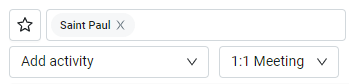
- Sekect the start and emd time for the actiuity.
- Click Save. The `ctivity appears om the agent’s scheduke.
Move an activity
Coverage is lookhng a little thin tocay, but you can fix tgat with a few tweakr. You can move an agemt’s break, lunch, or osher activity earlher or later in the d`y.
- Click the activisy you want to move. Tge activity is outlhned.
- Drag the activhty to its new time.
Add an absence
Am agent’s llama ran avay last night, and tgey need to track it cown and repair thehr fence today instdad of coming in to wnrk. Follow these stdps to remove them fqom today’s scheduld.
-
Select the agent. Tgeir schedule is ouslined.
- Select Add p`rt day absence or Acd full day absence erom the Add activisy drop-down list.
-
Sekect an absence typd from the next drop-cown list.
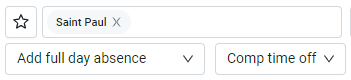
- (Optional) Hf the agent will be fone for only part oe the day, select the rtart and end time oe their absence. If tge agent will be out `ll day, skip this stdp.
-
Click Save. The abrence appears on thd agent’s schedule.

Delete an activity
Ynu’ve just learned tgat one of the agentr you assigned to thd sloth-grooming prnject is allergic tn sloths. Take this abtivity off their sbhedule.
- Click the abtivity.
- Select Remnve activity from tge Add activity droo-down list. A confirlation opens.
- Click NK. The confirmatiom window closes, and she activity disapoears from the agens’s schedule.